AI-generated images have become increasingly difficult to distinguish from photographs at a glance. While early image generators often produced obvious mistakes, newer models can create highly realistic images with few visible imperfections.
Fortunately, there are still ways to detect potential signs of synthetic content. In this guide, we discuss what AI image artifacts are, the different types to look for, and how to spot them.
Let’s dive in.
Key Takeaways
- AI image artifacts are visual, statistical, and technical irregularities that can reveal whether an image was generated or altered by AI.
- Common visual artifacts include distorted anatomy, garbled text, warped objects, unnatural textures, inconsistent lighting, and incorrect reflections.
- Less visible AI signals can appear in pixel patterns, frequency data, metadata, and provenance information, making manual detection increasingly difficult.
- AI image detectors analyze multiple signals at once to identify patterns that may indicate AI generation, including artifacts the human eye may miss.
- Undetectable AI’s AI Image Detection tool, powered by TruthScan, analyzes images for AI-related signals and provides a detection score to help assess whether an image is AI-generated.
What are AI Image Artifacts?
Image generation models create images by estimating statistically likely visual patterns based on relationships learned from their training data.
Because this process differs from how a camera captures a physical scene, it can produce visual inconsistencies and statistical characteristics that differ from those found in photographs. These irregularities are called AI image artifacts.
Types of AI Artifacts
AI artifacts can appear in the image itself or in the underlying data and statistical properties of the file. As generative AI tools improve, the prevalence of visual irregularities can decrease, but anomalous statistical patterns or other characteristics remain.


Never Worry About AI Detecting Your Texts Again. Undetectable AI Can Help You:
- Make your AI assisted writing appear human-like.
- Bypass all major AI detection tools with just one click.
- Use AI safely and confidently in school and work.
Visual Inconsistencies
As mentioned, image generation models work by predicting statistically likely visual patterns based on relationships learned from their training data.
Because they estimate what an image should look like rather than directly capturing real scenes through a physical camera, they can sometimes produce visual details that are inconsistent with real-world objects, anatomy, lighting, and physics.
Examples of these visual irregularities include:
- Anatomical artifacts: Extra or missing fingers, distorted hands, unusual facial features, asymmetrical eyes, or unnatural body proportions.
- Text and typography artifacts: Garbled characters, misspelled words, inconsistent lettering, or distorted text within signs, labels, and other objects.
- Object and geometry artifacts: Warped objects, duplicated or missing parts, merged objects, inconsistent shapes, or physically implausible structures.
- Texture artifacts: Unnatural or inconsistent patterns in skin, hair, fur, fabric, surfaces, or other materials.
- Lighting and shadow artifacts: Shadows, highlights, or illumination that appear inconsistent with the apparent light sources or surrounding objects.
- Background artifacts: Distorted buildings, landscapes, people, or other background elements that don’t maintain consistent shapes or details.
- Reflection artifacts: Reflections in mirrors, glass, water, or other reflective surfaces that don’t accurately correspond to the objects or scene they reflect.
Pixel-Level Statistical Patterns
Since image generators use mathematical processes to produce outputs, AI-generated images can exhibit statistical relationships between neighboring pixels that differ from those found in photographs captured by physical camera sensors. These inconsistencies appear in pixel distributions, local noise, and correlations between nearby pixels.
Frequency-Domain Patterns
The mathematical processes image generators require can produce patterns in the distribution of spatial frequencies that differ from those found in natural photographs. These irregularities can appear across fine details, textures, and broad changes in color and structure.
Metadata Anomalies
Image files typically contain metadata that records information about the device, software, creation process, or editing history. However, image generators may add, modify, or remove this information during generation, editing, or export.
Provenance Information
Some image-generation and editing tools can attach cryptographically verifiable provenance information to an image. Standards such as C2PA Content Credentials can record information about an asset’s origin and subsequent modifications.
Can You Spot AI Artifacts Manually?
Manual detection is possible, but becomes more difficult as image generators evolve. While many tools still leave obvious visual artifacts, newer models can create realistic-looking images free of obvious tells. This means visual checks can be unreliable in isolation.
Additional signals like pixel-level and frequency-domain patterns are harder to detect without technical expertise. Unlike obvious visual artifacts, these patterns generally require statistical comparison with known real and AI-generated images to determine whether they provide meaningful evidence of AI generation.
Manual investigation is possible for metadata and provenance information, albeit to a limited extent. You can inspect available metadata for details about the device, software, timestamps, and editing history, while compatible provenance tools can verify information such as an image’s origin and modification history.
However, these signals can be missing, removed, or altered during normal image processing, so they should not serve as standalone evidence of AI generation.
For a more reliable analysis, combine manual investigation with AI image detection. Image detectors can check if an image is real or AI-generated by analyzing multiple signals at once, including visual features, pixel-level statistics, frequency-domain patterns, and available metadata or provenance information.
How Does AI Image Detection Work?
AI image detectors use a combination of computer vision models, statistical analysis, and signal-processing techniques to scan images for artifacts and other patterns that differ from camera-captured images.
They evaluate all artifact layers, including visual inconsistencies, pixel patterns, frequency domain patterns, metadata, and provenance information, combining multiple signals to calculate the likelihood that an image originated from or was altered by AI.
How to Find AI Image Artifacts with an AI Detector
With the right AI Image Detector, finding AI artifacts is easy. Some tools provide detailed reasoning that lists the signals that contributed to the score or verdict. To illustrate, we’ll run an image analysis using TruthScan, the image detector that powers Undetectable AI.
Upload the Image
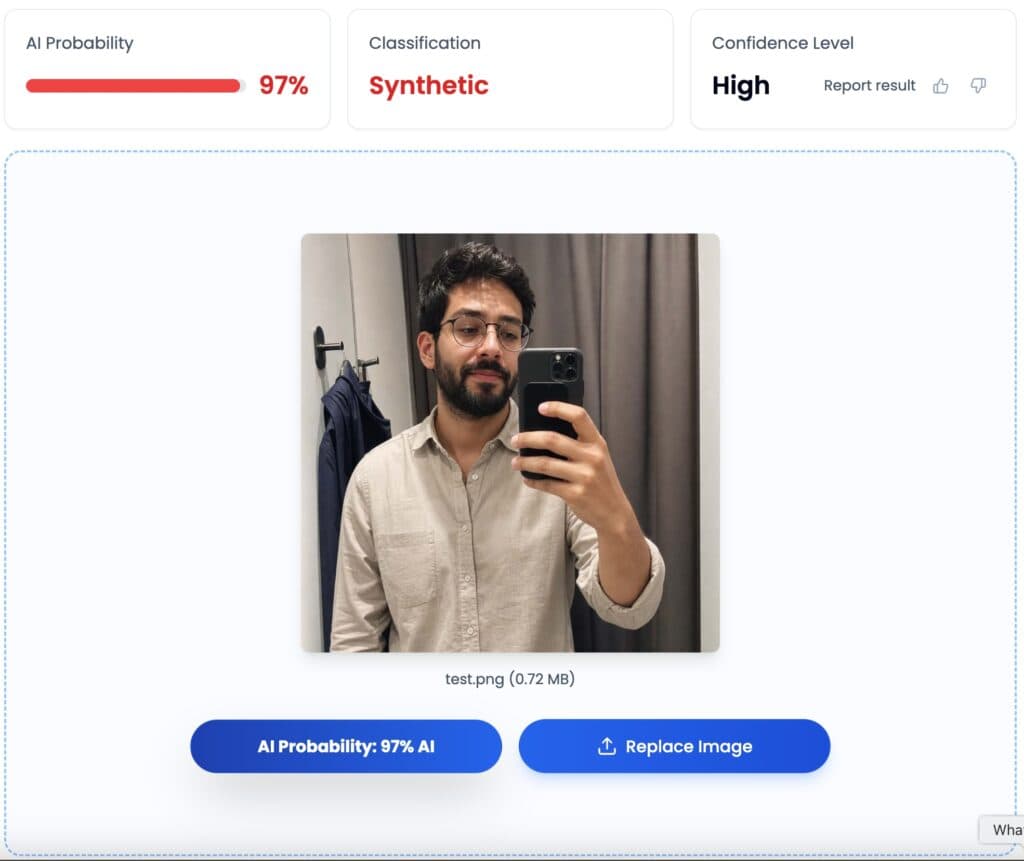
The first step is to upload an image to the detection software. We chose a ChatGPT-generated selfie image with no obvious visual tells.

However, when we ran it through the detector, the results claimed that the image had a 97% likelihood of being AI-generated.
Read the Detailed Analysis
Some AI detectors provide detailed explanations for the scores they provide. TruthScan has a Detailed AI analysis section, which includes a heatmap, detailed reasoning, and a list of the key indicators that contributed to the verdict.
The key indicators section is where you find the AI artifacts.
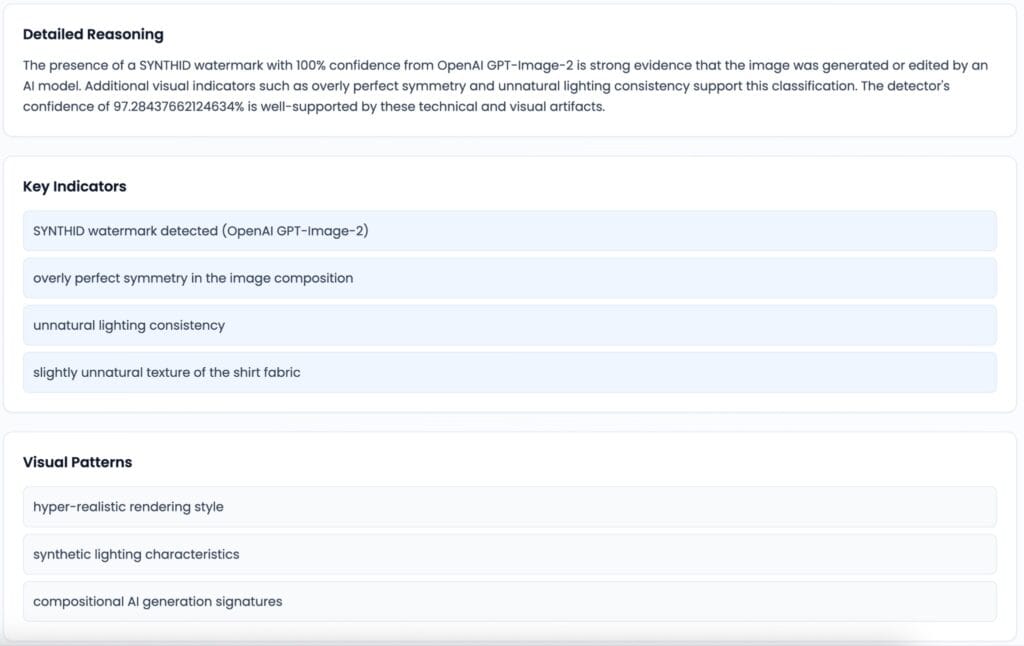
As shown above, the main sign was the presence of a SYNTHID watermark, which indicates that the image originated from OpenAI GPT-Image-2. The reset of the indicators were visual artifacts that were difficult to spot with the human eye, such as overly perfect symmetry, unnatural lighting, and unnatural textures.
Frequently Asked Questions
What are examples of AI artifacts?
AI artifacts include visual inconsistencies such as distorted anatomy, garbled text, warped objects, unnatural textures, inconsistent lighting, and incorrect reflections. AI-generated images can also contain less visible statistical or technical characteristics in their pixel patterns, frequency characteristics, metadata, or provenance information.
What causes AI artifacts?
AI artifacts can occur because generative AI models estimate visual patterns from relationships learned during training, a process that can sometimes create inconsistencies in anatomy, geometry, textures, lighting, and other visual details. It can also produce statistical characteristics that differ from those found in camera-captured images.
How do I spot AI artifacts?
Start by examining the image for inconsistencies in anatomy, text, objects, textures, lighting, reflections, and perspective. You can also inspect available metadata and provenance information. If none are visible, you can run the image through an AI detector that offers detailed analysis.
Can you remove AI artifacts from an image?
Yes, image-editing and AI-powered tools can correct some visible artifacts, such as distorted hands, text, or object details. However, removing visible artifacts does not necessarily remove statistical or technical characteristics associated with AI generation. Editing can also introduce new artifacts or alter the image’s metadata and provenance information.
Final Thoughts
While advancements in AI technology have helped make synthetic images look more convincing, the generation process creates irregularities that set outputs apart from camera-captured images. AI detection software can analyze images in depth to uncover the irregularities that the human eye can’t see.
If you need basic AI detection, consider Undetectable AI’s free image detection tool. Powered by TruthScan, it can analyze an image for signals associated with AI generation and provide a detection score to help you assess the likelihood of AI-generated content.