An average household in the United States has 21 smart devices connected to the internet, all of which are prone to online safety and security threats.
Each of these devices connects to online networks and stores and transmits data in one way or the other.
And as per a 2023 survey, 62% of smart home tech users worry about the privacy and security of their devices.
It totally makes sense to worry about your safety online because the internet is, frankly, a scary place. The number and types of dangers that exist online only keep on increasing.
But many of these risks can be reduced if your online behavior is responsible. By that, I mean that you take similar precautions to protect yourself online as you do in the physical world.
And in this article, you will find a comprehensive list of online safety tips.
Key Takeaways
- The internet exposes you to several safety and security threats, such as online scams, deepfakes, identity theft, online grooming, cyberbullying, etc.
- Strong, unique passwords and multi-factor authentication can protect your personal login information online.
- Kids and seniors should particularly be taught online safety tips so they can stay safe on the internet.
The Key Dangers of the Internet
The internet is, unfortunately, growing into a place of unwanted threats to which each of us is exposed to.
Pew Research Center recently surveyed 305 digital experts about their predictions for the changes on the internet we are likely to see by 2035.
37% of the experts responded by saying they are concerned about the direction the internet is headed towards in the future.


Never Worry About AI Detecting Your Texts Again. Undetectable AI Can Help You:
- Make your AI assisted writing appear human-like.
- Bypass all major AI detection tools with just one click.
- Use AI safely and confidently in school and work.
Here are some harmful effects of the internet we see making rounds in headlines quite frequently:
- Online scams that cause a financial hit of millions of dollars
- Online grooming, where an adult deliberately builds an emotional connection with a child online to gain their trust, so they can exploit the child
- Cyberbullying, particularly towards children and women
- Identity theft
- Cybersuicide, in which strangers meet online and decide to end their lives together online in real-time while they are on webcam
- Worsening anxiety and depression
- Manipulating people through disinformation and deepfakes
- Growing digital divides that increase inequality
- Use of sophisticated bots in civic and social spaces to influence opinions
- Rising levels of online crime
- Technology that constantly tracks your whereabouts without your explicit consent
Creating Strong And Secure Passwords
A very important measure to prevent yourself from the dangers of the internet is to protect your data.
Forbes reported that 46% of Americans had their passwords stolen in 2024, Password protection, 29% of which were reportedly hacked through social media.
A password breach could expose your personal data that anyone with malicious intents can misuse. Here are some online safety tips to ensure your passwords are secure:
- Use long and unique passwords
The same Forbes study also found that 30% of people who had their passwords hacked had used the same password across multiple platforms.
I understand that using the same password is convenient, but it is definitely not safe.
Also, 45% of Americans use a password consisting of eight characters or less. But the recommended password length for security purposes is at least 12 characters, ideally 16 or more.
Always create long, unique passwords for different sites you use and use a combination of uppercase and lowercase letters, numbers, and symbols. And for your convenience, use a secure password manager so you don’t forget any.
- Avoid personal information in logins
Many people make the mistake of using their personal information as the username or the password as logins for different platforms.
I’m sure you must’ve seen at least someone in your circle using their date or birth as their password, or their name, their pets name, any other personal identifier in their login info.
The chances of your account getting breached increase when you add personal info in logins because this info can easily be guessed.
- Enable two-factor authentication
Passwords, no matter how strong, are vulnerable to cyberattacks to some extent.
Even if, by chance, a hacker gets your password, they can’t access any of your accounts as long as you have two-factor authentication (2FA) turned on.
The most common form of 2FA is the one-time code you receive via email or SMS that auto-expires in a few minutes. The more secure version is through the authenticator app.
Make sure you have it turned on for every password you create.
Recognizing Phishing And Scams
Phishing is the practice of someone pretending to be contacting you from a reputable organisation so they can trick you into revealing personal information.
Your info could, then, be used to get access to your bank account, emails, or other private accounts, or sold to other scammers.
Any legitimate company will never email you with links that require you to share your info.
Here are some online safety tips against phishing:
- Never click on any suspicious links received via email, messages, social media, etc
- Always verify the email address of the sender. Slight variations in official addresses are often scams
- Grammar, punctuation, or spelling errors in emails/messages are likely scams
- Avoid using public Wi-Fi networks for any financial transactions, or for anything at all, for that matter
Protecting Personal Information Online
The more info you have about yourself on the internet, the greater the chances of it getting misused. Therefore, try to limit sharing your personal details over social media as much as possible.
Also, we all love free Wi-Fi at public places, but they are not the most secure when it comes to protecting your personal information.
If possible, avoid using public Wi-Fi networks, and if you have to use them, do not log into your financial accounts or input any sensitive media over a public network.
And on any website where you’re about to enter your personal data, make sure it comes from a secure network site provider. A lock sign and a URL beginning with ‘https’ indicate that the site is secure.
20+ More Essential Internet Safety Tips
Besides what we’ve discussed so far, here are some more miscellaneous online safety tips for seniors, kids, and for the general population.
Device and Software Security
The internet exposes you to different types of malware, like viruses, spyware, ransomware, trojans, etc.
Here are some tips to protect your devices from malware:
- Use a security software to block such malicious programs before they cause damage to your system.
- Always keep your software updated to the latest release.
- Make a habit to periodically back up your most important files to a secure cloud-based service. Review your backed-up data to ensure they are the most updated versions.
- Try to avoid connecting unknown USB drives to your computer as much as you can because USBs are the most common route for malware to get into your system.
- Cover the webcam on your devices when it is not in use to protect yourself against camfecting, i.e., getting unauthorized access to your webcam to record you.
- Make sure that the Google Chrome extensions you install come from trusted sources only. Anyone can code an extension to be downloaded for free through Chrome, and they can be unsafe.
Network Safety
- As I said earlier, try to avoid using public Wi-fi if you have to log-in to any of your accounts.
- If you have to, use a VPN to protect your data from being intercepted by others on the same network. The VPN encrypts your internet traffic into unreadable code as it travels between your device and the internet. It will also mask your IP address.
- If you use a public computer (in libraries, schools, hotels, or internet cafés), always log out of your accounts after finishing your session. Also, clear your browser history, cookies, and cached data.
Financial and Online Shopping Safety
- One of the best online shopping safety tips is to make a habit of reviewing your bank account statement every few days. In cases of fraud, financial institutions have time limits within which fraudulent transactions must be reported in order to be reversed.
- Set up account alerts for unusual logins to your bank apps, if you receive an alert about a login you did not initiate, it indicates an attempt of someone breaking into your account.
- Sign up for a breach notification service that monitors the internet for data leaks. If your email address/personal information shows up in a leak, they will send you a notification.
Social Media Safety
- Always ensure you limit your posts to friends only and restrict who can send messages. And implement these online safety tips for seniors and kids around you in particular.
- Go through your settings to manage location permissions for social media apps on your devices. Restrict access to location to apps only while they are in use, or disable it entirely.
- Review your follower list every few months to remove the accounts you do not recognize. Sometimes, fake profiles created by scammers may be added to your friends list in hopes of collecting your information for a scam attack.
Online Dating Safety Tips
- Always conduct a background check for anyone you talk to online. Search for their name and photos online to ensure they are a legitimate person.
- Do not share your whereabouts, your home and work address, until you trust the person enough.
- Be wary of people who pressure you into sending them money, for whatever reason, early in your relationship, especially through crypto.
Online Behavior Awareness
- Ensure you take the time to research the source of any offer you come across online and verify its original source before believing in it. Avoid too good to be true offers.
- Avoid interacting with pop-up ads that appear when you are browsing on the internet. A pop up that claims that your device is infected with a virus or that you must urgently install a security update is likely a scam.
- If you come across a fake account on any platform that consistently sends unsolicited messages or posts suspicious links, report it immediately.
- Block any suspicious users you see online so they can not interact with your profile.
Online safety tips for kids
- Educate your kids about online safety tips, i.e., not sharing personal information, avoiding conversations with strangers, telling a trusted adult if they feel uncomfortable.
- Use built-in parental controls, particularly on social media accounts, for your children to limit their access to certain types of content
- Teach online gaming safety tips to your children, and help them choose online friends to play with carefully. Be wary of hate speech and harassment, etc.
Smarter Protection With AI Tools
AI, unfortunately, is also increasingly being used to deceive people online. The primary concern with the use of AI online is how easy it is for anyone to generate any kind of media they want, with no skills needed.
Such images and videos generated through AI tools are known as deepfakes.
Needless to say, deepfakes are dangerous. A scammer may use AI-generated media to impersonate someone and manipulate you into sending them money, for example.
DeepStrike, a cybersecurity firm, reports that the number of deepfakes has surged from 500K in 2023 to 8 million plus in 2025.
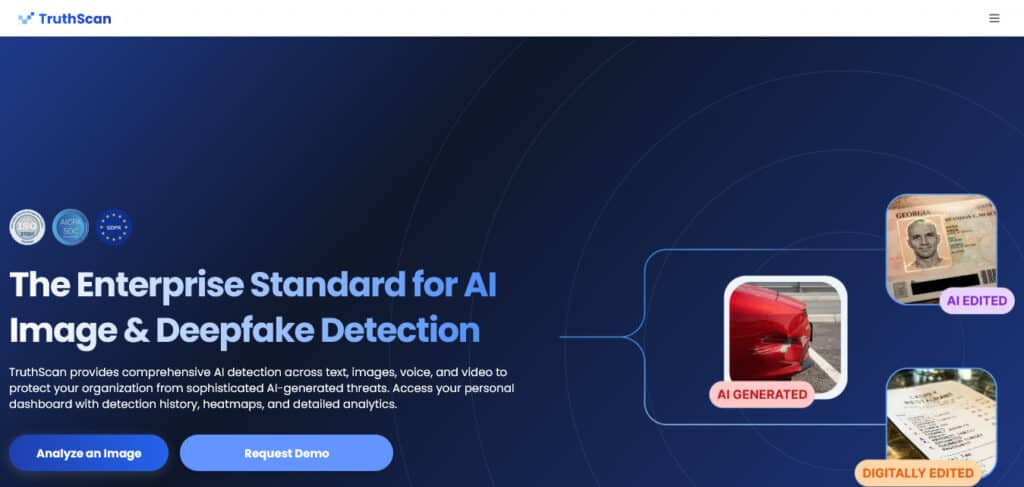
Any images you come across on your socials or through your email, always verify them through a trusted deepfake detection technology.
Undetectable AI offers an AI Image Detector powered by TruthScan for photos and videos through a multimodal analysis that will explain why exactly the media may be unsafe.
All you have to do is upload the media for the tool to get to work.
And whenever you are unsure of an online behavior, you could turn to AI Chat to describe the situation you are in and get instant safety advice.
Check your content using our AI Detector and Humanizer below!
Final Thoughts
Your online behavior, for the most part, is under your direct control. If you keep your activity protected through the online safety tips we discussed above, you will stay safe.
Just do your part by actively following these tips and investing in the right safety tools.
Install device security software, subscribe to data breach notification services, use TruthScan for verifying all kinds of online photos and videos, and use Undetectable AI Chatbot whenever in doubt.
Check out Undetectable AI to learn more about our deepfake detection tech that can help you stay safe online.