Writing an important email? Preparing a report to impress your coworkers and superiors? Penning a love note for your partner? Before you hit send or stand in front of your audience, you want a second pair of eyes to make sure your writing holds up.
If you do not have the people or the time for that, you have probably asked yourself: can ChatGPT proofread and give you that quick but thorough once-over?
The short answer is yes, with limits. ChatGPT is genuinely good at catching spelling slips, basic grammar errors, and awkward sentence structures. It is much less reliable when it comes to tone, cultural context, or anything you would hand to a lawyer, doctor, or dissertation committee.
In this post, we will look at how well ChatGPT actually proofreads, which version of the tool is worth using for editing work, and how to get the most out of it without losing the human feel of your writing.
Let’s get into it.
Key Takeaways
- ChatGPT catches objective errors well: spelling, basic grammar, and missing punctuation in short to medium texts.
- Output quality depends heavily on your prompt. The AI needs specific instructions if you want it to check tone, style, or a particular format.
- It still struggles with context. Cultural references, sarcasm, and industry jargon can slip past it undetected.
- A hybrid approach works best: let ChatGPT handle the first clean-up pass, then do a manual read-through for the details it missed.
- Tools like the AI Humanizer add the finishing layer that keeps AI-assisted edits from sounding stiff or repetitive to readers.
Can ChatGPT Proofread Effectively?
Since its launch in late 2022, ChatGPT has become a go-to tool for personal and professional writing tasks. It is a generative AI tool that provides human-like answers to almost any instruction, and if you want feedback fast, it beats waiting on a traditional editing service.
The tool has changed a lot since its early days, and the model lineup keeps shifting every few months as OpenAI rolls out updates. What matters for proofreading is not the exact model name but which mode you are using, since that decides how carefully ChatGPT reads your text. We will cover that next.
Even on the fastest, lightest setting, ChatGPT is surprisingly capable of spotting grammar issues, missing commas, and clunky sentence structures.


Never Worry About AI Detecting Your Texts Again. Undetectable AI Can Help You:
- Make your AI assisted writing appear human-like.
- Bypass all major AI detection tools with just one click.
- Use AI safely and confidently in school and work.
Which ChatGPT Model Should You Use for Proofreading
ChatGPT no longer runs on a simple “free version vs. paid version” split. Today it offers a few response modes, and picking the right one matters more for proofreading than picking a specific model number, since OpenAI renames and upgrades these every few months.
Instant Mode: Fast Edits for Everyday Writing
This is the default, quick-response mode. It is fine for emails, Slack messages, short blog posts, and anything where you mostly need a grammar and spelling sweep. Don’t expect it to catch subtle logic gaps or tone mismatches.
Thinking Mode: Better for Nuance and Longer Documents
Thinking mode takes a bit longer to respond because it works through the text in more steps. This is the one worth switching to for longer documents, technical writing, or anything where tone and consistency actually matter.
If you are on a paid plan, this is usually available as a selectable option rather than something that kicks in automatically, so check your settings if you want deeper edits.
Is Pro Worth It for Editing Work?
Pro-tier modes are built for the hardest reasoning and research tasks, not proofreading. Unless you are running very long, technical, or multi-part documents through the tool regularly, Instant or Thinking mode will cover most proofreading needs without the extra cost.
Proofreading Examples and Sample Results
Take a sentence like: “The companys growth were exceptional, but they’re strategy was flawed.”
Ask ChatGPT to fix this, and it will correctly flag that “companys” needs an apostrophe, “were” should be “was” to match the singular subject, and “they’re” should be the possessive “their.”
The catch is that these corrections are not always highlighted automatically. You often have to specifically ask ChatGPT to “list all the changes you made” so you can see exactly what was fixed, otherwise you are stuck comparing two versions of the text side by side.
Before and After: A Real Proofreading Example
Seeing the fix side by side makes the value clearer than reading about it.
Before: “The companys growth were exceptional, but they’re strategy was flawed.”
After: “The company’s growth was exceptional, but their strategy was flawed.”
Three small fixes, one clean sentence. Apostrophe added, subject-verb agreement corrected, and the possessive pronoun swapped in. This is the level ChatGPT handles reliably. Anything past this, like whether “exceptional” is really the right word for the context, needs a closer human read.
How to Use ChatGPT for Proofreading: Step-by-Step
ChatGPT works best with clear, specific instructions. A detailed prompt gets you a much better result than pasting your text and hoping for the best. Think of it as a mirror: it reflects the quality of what you feed it.
Step 1: Log in. Head to ChatGPT from a browser or the mobile app and sign in, or create a free account if you don’t have one.
Step 2: Write a targeted prompt before pasting your text. Don’t just paste and wait. Tell it what you want first, then give it the text.
Step 3: Read the suggestions before applying them. Check whether the changes actually fit your voice. If something feels off, keep refining with follow-up prompts like “make it more concise” or “use simpler vocabulary.”
Copy-Paste Prompts for Common Proofreading Tasks
Save these. They cover the situations you will run into most often.
The Grammar-Only Pass
“Proofread the following text for grammar, spelling, and punctuation only. Do not change my word choice, tone, or sentence structure unless there is an actual error. List every change you made at the end.”
The Tone-Shift Pass
“Rewrite the following text to sound more [conversational / formal / confident], while keeping the meaning exactly the same. Keep it close to my original phrasing where possible.”
The Style-Guide Pass
“Proofread this text according to [AP style / Chicago style / British spelling]. Flag anything that doesn’t follow that style and explain why.” If you want a head start on building your own rules, our guide on how to Provide Style Guides walks through setting one up.
The Explain-Your-Changes Pass
“Correct any errors in this text, then give me a numbered list explaining exactly what you changed and why. Do not rewrite anything that isn’t actually wrong.”
Common Mistakes ChatGPT Might Miss

ChatGPT is a pattern matcher, not a conscious reader. That means it can miss the “soul” of your writing even when the grammar checks out.
Contextual Errors
ChatGPT might not catch that a word is technically real but wrong for your situation. Write about a “bazaar” and accidentally type “bizarre,” and the AI might assume you meant something strange rather than a marketplace, especially if the surrounding sentences don’t make the setting obvious.
Tone and Nuance Issues
Sarcasm, dry humor, and specific brand voices tend to trip it up. It defaults to a “helpful assistant” tone that can feel generic. If your writing needs a sharp or unusual personality, ChatGPT might smooth out the exact character that makes it stand out.
Industry-Specific Terminology
It can misread highly specialized jargon or slang that emerged after its last update. On a scientific paper or a niche legal brief, its “corrections” might actually change the technical meaning of your work.
Inconsistent Formatting and Logic
In a long document, ChatGPT might use one capitalization style in the first paragraph and a different one in the fifth. It doesn’t reliably track every stylistic choice across thousands of words, which can leave you with a fragmented final draft.
Repetitive Phrasing
AI often falls into “linguistic loops,” opening every paragraph with the same transition word, like “additionally” or “moreover.” A human editor would catch this and vary the flow. ChatGPT tends to see these as safe, grammatically correct choices and leaves them alone.
ChatGPT vs. Human Proofreaders: What’s the Difference
| Feature | ChatGPT Proofreading | Human Proofreader |
|---|---|---|
| Speed | Near instant (seconds) | Hours to days, depending on length |
| Cost | Free or low cost | Professional rates per word or hour |
| Grammar & Spelling | Excellent for basic errors | High accuracy with added context |
| Contextual Depth | Limited to what’s in the prompt | Understands culture and subtext |
| Subjective Feedback | Formulaic and predictable | Personal, creative, and insightful |
| Consistency | Can drift in long documents | Maintains one voice throughout |
ChatGPT vs. Other AI Proofreading Tools
ChatGPT isn’t the only AI option for cleaning up your writing, and it isn’t always the right one for the job.
| Tool | Best For | Where It Falls Short |
|---|---|---|
| ChatGPT | Quick edits, rewriting, flexible prompts | No dedicated grammar interface; you have to prompt for everything |
| Grammarly | Real-time grammar and tone checks as you type | Less flexible for big rewrites or style overhauls |
| Claude | Long documents, nuanced tone work, careful editing | Not built as a plug-and-type grammar tool like Grammarly |
| QuillBot | Paraphrasing and quick sentence rewrites | Weaker at catching deep contextual or factual errors |
If you’re doing a quick grammar sweep while typing, a dedicated checker like Grammarly is more convenient. If you’re reworking a whole document’s tone or structure, a conversational AI like ChatGPT or Claude gives you more control.
Best Practices for Getting the Most Out of AI Proofreading
Treat the AI like a project you’re managing, not a tool you just fire and forget.
Break Long Text Into Sections
ChatGPT has a context window, a limit on how much it can process well at once. Paste in an entire 50-page report and it will lose the thread. Feed it one chapter or section at a time so it stays focused on that segment’s grammar and flow.
Combine AI With Manual Review
Never treat AI output as final. Let it handle the grunt work of finding typos and basic errors, then read the cleaned-up version out loud yourself. Hearing the words catches awkward rhythms the AI missed, or introduced.
Use Multiple Tools for Cross-Checking
No single tool catches everything. Run your draft through ChatGPT first, then a grammar checker, then a humanizing tool. Layering catches more than relying on one pass.
Quick Prompting Tricks Worth Stealing
- Assign a persona. Tell it to “act as a professional copy editor for a fashion magazine.” This gives it a stylistic framework to follow.
- Ask for explanations. “Why did you make these changes?” helps you actually learn instead of just accepting edits blindly.
- Provide style guides. Rules like “no Oxford commas” or “use British spelling” save you back-and-forth.
- Request alternatives. “Give me three ways to rewrite this for clarity” hands you options instead of one fixed answer.
Types of Written Work ChatGPT Can Proofread
ChatGPT adapts its proofreading style depending on what you’re working on.
Business Emails and Slack Messages
Before sending a high-stakes email to a client, run it through ChatGPT to check the tone and tighten the message. It’s a fast sanity check that cuts down on pre-send anxiety.
Academic Essays and Research Papers
Students can use it to check APA or MLA formatting consistency and basic logic flow. It’s becoming a standard companion for improving academic writing.
Blog Posts and Articles
For content creators, it can check keyword placement and readability, and flag headings that need to be catchier or paragraphs that run too long for mobile readers.
Creative Stories and Poems
It won’t write a masterpiece for you, but it can flag clichés and repetitive word choices in your fiction. It’s useful for polishing the prose so the story itself can shine.
How Undetectable AI Can Improve AI-Proofread Content
Relying entirely on AI to rewrite your work, rather than just clean it up, can create real problems. Letting ChatGPT catch minor errors is low risk. Letting it rewrite entire sections raises plagiarism concerns and can trip AI detectors.
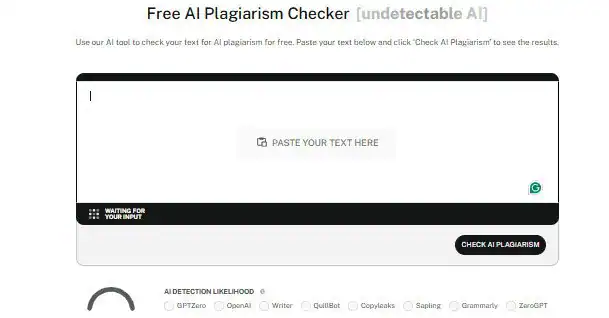
Run your proofread drafts through our AI Plagiarism Checker to confirm you haven’t accidentally retained identifiable strings of AI-generated text. Large language models draw from a finite set of training data, which can produce phrasing that reads as unoriginal even when you didn’t mean to copy anything.
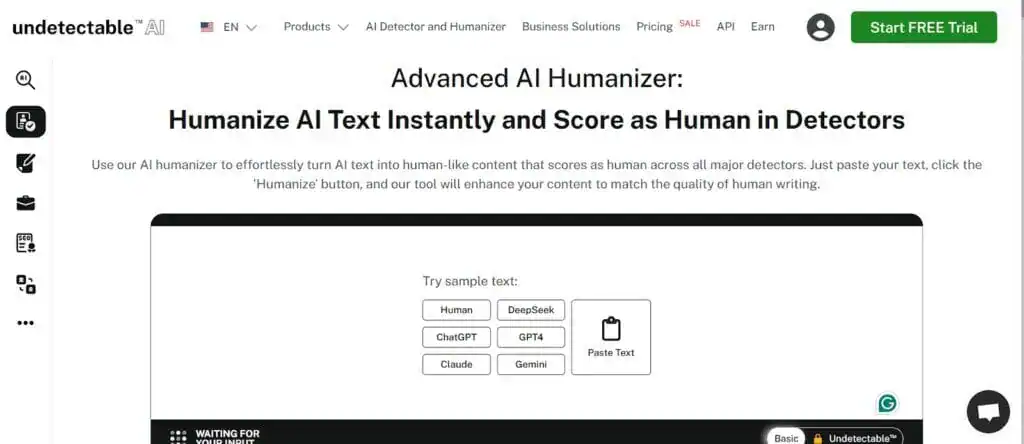
Once you’re confident the content is original, run it through our AI Humanizer. It adjusts the predictability of the text so it flows with the natural variation readers expect from a human writer, without the “robotic” giveaways.
When You Shouldn’t Rely Only on ChatGPT for Proofreading
Some situations call for more than an AI pass. If you’re submitting a legal contract, a medical document, or a final thesis, the risk of a hallucinated detail or a missed contextual error is too high. You need a human professional who can take responsibility for the accuracy of the final text.
For everyday content, tools across our suite, including the AI SEO Content Writer and AI Stealth Writer, can help you produce drafts that need less cleanup in the first place.
Frequently Asked Questions
Is it safe to paste confidential work into ChatGPT for proofreading?
Be careful. Depending on your account type and settings, conversations may be used to improve OpenAI’s models unless you’ve turned that off or you’re on a plan that excludes it by default.
Avoid pasting sensitive corporate data, legal information, or personal identifiers unless you’ve confirmed your privacy settings.
Does ChatGPT save what I paste in?
It can, depending on your settings and plan. Temporary or privacy-focused chat modes and certain business plans are built not to retain or train on your inputs, but standard consumer accounts may store conversation history by default. Check your data controls before pasting anything sensitive.
Does using ChatGPT for proofreading count as plagiarism?
Generally, no. Proofreading for grammar and spelling functions like a spell checker. Asking the AI to rewrite large sections of someone else’s original work is a different story and raises real ethical issues.
Can ChatGPT check for plagiarism directly?
Not reliably. ChatGPT isn’t built as a plagiarism detector, and it can miss close paraphrasing or matches to sources outside its training data. Use a dedicated tool like an AI Plagiarism Checker if originality actually matters for what you’re publishing.
Can ChatGPT proofread in languages other than English?
Yes, and it handles many major languages reasonably well. Accuracy drops for less common languages, regional dialects, and idioms, so treat results in non-English languages with a bit more caution than English output.
Is ChatGPT better than Grammarly?
They do different jobs. Grammarly is built specifically for real-time grammar and tone checks as you type. ChatGPT is more flexible for full rewrites, tone shifts, and custom instructions, but it takes more setup to get the same consistency Grammarly gives you automatically.
How long can my text be before ChatGPT starts losing accuracy?
There’s no exact cutoff, but accuracy and consistency tend to drop in very long documents. Breaking a large piece into sections of a few pages at a time keeps the AI focused and gives you more reliable results.
Can ChatGPT check for specific style guides like AP or Chicago?
Yes, if you include that in your prompt. Say “proofread this according to AP style rules for numbers and titles,” and it follows rule-based instructions like this fairly well.
Conclusion
Writing and editing go hand in hand, and the right tools decide whether a draft gets ignored or actually gets read. The answer to can ChatGPT proofread is yes, but it works best as a fast first pass, not a final authority.
Use it to handle the mundane cleanup, then bring in a human read, or a tool built for the job, for anything that needs a sharper eye. Combine ChatGPT’s speed with a plagiarism check and a humanizing pass, and you get writing that’s both technically clean and unmistakably yours.
Head to Undetectable AI to run your next draft through that full check before you hit publish.