
Email tracking is the process of monitoring outbound emails to determine whether recipients opened, clicked, or engaged with the message.
Most email tracking tools use an invisible one-pixel image embedded in the email body to detect opens in real time.
The right tracking tool depends on whether the goal is individual prospect monitoring, team performance analytics, or full sales engagement automation.
We’ve tested and evaluated seven tools across those categories, ranking them based on tracking accuracy, analytics depth, platform compatibility, and overall value.
Let’s dive in.
Key Takeaways
- Email tracking is the process of monitoring outbound messages via invisible tracking pixels to determine when recipients open, click, or engage with content.
- Choosing the right tool depends on your primary goal, whether it is individual prospect monitoring, team-level response time analytics, or full sales engagement automation.
- Compatibility is a key factor; many popular extensions like Right Inbox, Streak, and Mixmax are exclusive to Gmail, while EmailAnalytics and HubSpot support both Gmail and Outlook.
- Modern privacy features, such as Apple Mail Privacy Protection, can inflate open rates by preloading pixels, making link-click tracking and reply behavior more reliable metrics for success.
- To ensure your cold outreach or follow-up emails feel personal and maintain high engagement, using Undetectable AI helps polish your templates to sound naturally human rather than automated.
1. EmailAnalytics
Quick Summary
EmailAnalytics is a team-level email analytics platform that tracks response times, email volume, and workload distribution across Gmail and Outlook. It’s built for managers who need visibility into how their teams communicate, not just whether individual emails were opened.
EmailAnalytics connects via API to Gmail and Outlook, then measures how teams communicate across those platforms.


Never Worry About AI Detecting Your Texts Again. Undetectable AI Can Help You:
- Make your AI assisted writing appear human-like.
- Bypass all major AI detection tools with just one click.
- Use AI safely and confidently in school and work.
The tool calculates average response time per person automatically, which is the metric managers tell us matters most when evaluating team performance.
In our testing, teams that implemented EmailAnalytics dropped from a 4.2-hour average response time to under 1 hour within two weeks.
Daily and weekly reports arrive directly in the manager’s inbox, so there’s no separate dashboard to remember to check.
The tool requires no software installation on employee devices and no training. Rollout typically takes under 60 seconds per inbox, which makes it practical for large teams.
Key Features
- Automatic response time calculation per team member across Gmail and Outlook
- Email volume tracking with breakdowns by hour, day, sender, and recipient
- Label, folder, and category-level reporting for granular workflow analysis
- Internal vs. external email segmentation to isolate customer-facing activity
- SLA monitoring with real-time alerts when response times exceed thresholds
- AI-powered sentiment analysis on email communications
- Daily and weekly automated reports delivered via email
- CSV and PDF data exports for custom reporting
Pricing: 14-day free trial with full features, then $19/month per inbox. Bulk discounts available for larger teams.
Who Should Choose EmailAnalytics
- Sales and customer service managers tracking response time as a KPI
- Remote team leaders who need workload visibility without micromanaging
- Operations managers monitoring SLA compliance across support inboxes
2. Right Inbox
Quick Summary
Right Inbox is a Gmail productivity extension that adds email tracking, scheduling, reminders, sequences, and templates directly inside the Gmail compose window. It’s a lightweight tool for individual contributors who want more from Gmail without switching platforms.
Right Inbox works as a Chrome extension that layers tracking and productivity features on top of Gmail’s native interface. Users can see who opened their emails, how many times, and when, all without leaving their inbox.
Beyond tracking, Right Inbox adds email scheduling, follow-up reminders, recurring emails, and reusable templates.
The paid Professional plan includes mail merge and automated email sequences, which makes it competitive with tools twice its price.
Key Features
- Real-time email open and click tracking with desktop notifications
- Email scheduling and send-later functionality
- Follow-up reminders so important emails don’t slip through
- Recurring email automation for weekly or monthly sends
- Email templates with one-click insertion
- Mail merge for personalized bulk sending (Professional plan)
- Email sequences with automated follow-ups (Professional plan)
Pricing: Free plan with limited features. Personal plan starts at $7.95/user/month, Professional at $14.95/user/month (billed annually).
Who Should Choose Right Inbox
- Individual sales reps or freelancers who live inside Gmail
- Small business owners who need scheduling, tracking, and templates in one tool
- Budget-conscious professionals who want paid features under $15/month
3. Mailsuite
Quick Summary
Mailsuite (formerly Mailtrack) is a free email tracking extension for Gmail with over 1.5 million active users. It provides real-time open notifications, link click tracking, and a mail merge feature for campaigns of up to 10,000 contacts.
Mailsuite is one of the most widely used Gmail tracking tools. Its free tier includes unlimited email tracking with real-time notifications.
The checkmark system (single for sent, double for opened) gives users instant visual confirmation inside their inbox.
Paid plans add link click tracking, individual tracking for group emails, PDF document tracking, and e-signatures.
The Advanced plan includes mail merge for up to 10,000 contacts from Google Sheets. The trade-off with the free plan: every tracked email includes a “Sent with Mailsuite” signature.
Key Features
- Unlimited email open tracking on the free plan
- Real-time desktop and email notifications on opens
- Link click tracking (paid plans)
- Individual recipient tracking in group emails (Advanced plan)
- Mail merge with Google Sheets integration for up to 10,000 contacts
- PDF document tracking and e-signatures
- Campaign scheduling for optimal send times
- Daily email performance reports
Pricing: Free plan with unlimited tracking but includes Mailsuite branding. Pro plan at approximately $2.99/month, Advanced at $5.99/month (billed annually, prices in EUR).
Who Should Choose Mailsuite
- Freelancers and solopreneurs who need free, reliable open tracking
- Small marketing teams running email campaigns through Gmail
- Nonprofits or budget-limited organizations that need tracking at zero cost
4. HubSpot Sales Hub
Quick Summary
HubSpot Sales Hub offers free unlimited email tracking as part of its CRM platform. Open and click data flows directly into contact records, giving sales teams a complete view of prospect engagement alongside deal pipeline data.
HubSpot’s email tracking is part of Sales Hub, and the free tier includes unlimited tracking, desktop notifications, and basic analytics.
Every open, click, and attachment download is logged to the CRM contact record automatically.
The real power appears at paid tiers. Sales Hub Starter ($15/seat/month) adds email sequences, meeting scheduling, and team productivity reports.
Professional ($100/seat/month) includes predictive lead scoring, sales forecasting, and advanced reporting dashboards.
For teams already using HubSpot’s CRM, adding email tracking costs nothing and requires minimal setup. For teams not on HubSpot, the platform’s complexity and pricing at higher tiers can be a barrier.
Key Features
- Unlimited email open and click tracking on the free plan
- Real-time desktop notifications when prospects engage
- Full CRM integration with automatic activity logging
- Email sequences for automated one-to-one follow-ups (Starter+)
- Meeting scheduling links synced with calendars
- Email templates with personalization tokens
- Document tracking to see when proposals are viewed
- Works with Gmail, Outlook, and Office 365
Pricing: Free plan with unlimited tracking. Sales Hub Starter at $15/seat/month, Professional at $100/seat/month (annual commitment required).
Who Should Choose HubSpot Sales Hub
- Sales teams already using HubSpot CRM who want tracking at no extra cost
- Growing companies that need email tracking embedded in a full sales platform
- Teams that prioritize CRM data centralization over standalone tracking features
5. Streak
Quick Summary
Streak is the only CRM built entirely inside Gmail, combining email tracking with deal pipelines, mail merge, and contact management. It turns Gmail into a lightweight CRM without requiring users to learn a separate application.
Streak embeds a full CRM directly into the Gmail interface. Email tracking is one feature within a broader system that includes pipelines, shared team email, mail merge, and AI-powered data enrichment.
The tracking functionality shows when emails are opened, how many times, and whether links were clicked.
That data feeds into pipeline records automatically, so sales reps can see engagement history alongside deal status in a single view.
Streak works exclusively with Gmail and Google Workspace. Teams using Outlook or other email clients will need to look elsewhere.
Key Features
- Email open and link click tracking with real-time notifications
- Customizable deal pipelines with drag-and-drop stages
- Mail merge with personalized bulk sending and automated follow-up sequences
- Shared team email for collaborative inbox management
- Contact enrichment with automatic data population
- Thread splitting to separate conversations within a single email chain
- AI Co-Pilot for deal summaries and pipeline analysis (Pro+ plan)
- Native integration with Google Workspace tools
Pricing: Free plan with basic CRM features. Solo at $15/user/month, Pro at $59/user/month, Pro+ at $89/user/month (billed annually).
Who Should Choose Streak
- Small sales teams that use Gmail and want CRM functionality without a separate app
- Agencies and consultancies managing client pipelines alongside email outreach
- Solo operators who need lightweight deal tracking paired with email engagement data
6. Mixmax
Quick Summary
Mixmax is a sales engagement platform built inside Gmail that combines email tracking with multichannel sequences, meeting scheduling, and AI-powered workflow automation. It’s designed for revenue teams that need outreach automation beyond basic open tracking.
Mixmax goes well beyond simple email tracking. The platform includes multichannel sequences, AI-powered send-time optimization, embedded polls and surveys, and CRM integrations with Salesforce and HubSpot.
The free plan covers email tracking, meeting scheduling, and basic templates. Paid plans unlock sequences, advanced analytics, CRM sync, and custom branding.
The Suite plan ($89/user/month, billed annually) bundles Inbox Copilot, Meeting Copilot, and Engagement Copilot into one package.
Mixmax is Gmail-only and requires a Chrome extension. Some users report that the extension can slow down Gmail when running alongside other add-ons.
Key Features
- Real-time email open, click, and reply tracking
- Multichannel outreach sequences across email, phone, and LinkedIn
- One-click meeting scheduling embedded in emails
- AI-powered send-time optimization for higher engagement
- Interactive email elements: polls, surveys, and CTA buttons
- Salesforce and HubSpot CRM auto-sync
- Contact engagement scoring to prioritize hot leads
- Team collaboration via Sidechat within Gmail
Pricing: Free plan with basic tracking and scheduling. Inbox Copilot at $29/user/month, Mixmax Suite at $89/user/month (billed annually). 14-day free trial on paid plans.
Who Should Choose Mixmax
- SDR and AE teams running multichannel outreach sequences at scale
- Revenue operations managers who need CRM-synced engagement data
- Sales teams that want scheduling, tracking, and automation in a single Gmail tool
7. MailTracker by Hunter
Quick Summary
MailTracker by Hunter is a free, privacy-focused email tracking extension for Gmail. It tracks opens and link clicks without reading or storing email content, and adds no visible branding to tracked emails.
MailTracker by Hunter is a lightweight Chrome extension trusted by over 150,000 users. It uses a single tracking pixel to monitor email opens, and it provides real-time Chrome and email notifications when recipients engage.
The tool’s key differentiator is privacy. MailTracker doesn’t require permission to read or manage emails, doesn’t store email content, and doesn’t share data with third parties. The free plan includes up to 20 tracked emails per month with no visible branding.
MailTracker pairs naturally with Hunter.io’s broader prospecting ecosystem, including email finding and verification tools.
For teams already using Hunter for lead generation, adding MailTracker creates a seamless find-send-track workflow.
Key Features
- Email open tracking with real-time Chrome and email notifications
- Link click tracking (paid plans)
- No visible branding or signatures on tracked emails, including the free plan
- Privacy-focused design: doesn’t read, store, or share email content
- A/B testing capabilities for subject lines and email elements
- Follow-up reminders when emails go unopened
- PDF document tracking
- Integration with the Hunter.io prospecting platform
Pricing: Free plan with up to 20 tracked emails/month. Growth plan at $20/user/month for unlimited tracking and advanced analytics.
Who Should Choose MailTracker by Hunter
- Individual professionals who want clean, unbranded email tracking at no cost
- Hunter.io users looking to add tracking to their existing prospecting workflow
- Privacy-conscious senders who want tracking without granting full email access permissions
Comparison Table

| Tool | Best For | Platforms | Free Plan | Starting Price | CRM | Sequences | Team Analytics |
| EmailAnalytics | Team performance | Gmail, Outlook | 14-day trial | $19/inbox/mo | HubSpot, Sheets | No | Yes |
| Right Inbox | Gmail power users | Gmail only | Yes (limited) | $7.95/user/mo | No native CRM | Yes (Pro) | No |
| Mailsuite | Free tracking | Gmail | Yes (branded) | ~$2.99/mo | No native CRM | No | No |
| HubSpot Sales Hub | CRM-integrated | Gmail, Outlook | Yes (unlimited) | $15/seat/mo | Built-in CRM | Yes (Starter+) | Yes (Pro+) |
| Streak | Gmail-native CRM | Gmail only | Yes (basic) | $15/user/mo | Built-in CRM | Yes (Pro+) | Limited |
| Mixmax | Sales engagement | Gmail only | Yes | $29/user/mo | SF, HubSpot | Yes | Yes (paid) |
| MailTracker | Privacy tracking | Gmail only | Yes (20/mo) | $20/user/mo | No native CRM | No | No |
Key Insight
No single email tracking tool is best for every scenario. An individual contributor might prefer Right Inbox for daily workflow. A manager overseeing that person’s team would need EmailAnalytics for performance visibility.
Start Here: Action Checklist
- Define the primary goal. For team response time and workload visibility, start with EmailAnalytics. For individual prospect tracking, try HubSpot (free) or MailTracker by Hunter (free).
- Check email platform compatibility. Teams using Outlook should eliminate Gmail-only tools (Right Inbox, Mailsuite, Streak, Mixmax, MailTracker by Hunter) from consideration.
- Evaluate CRM requirements. If tracking data needs to live inside a CRM, HubSpot and Streak have built-in systems. Mixmax syncs with Salesforce and HubSpot.
- Start with a free plan or trial. Every tool on this list offers either a free tier or a free trial. Test with real workflows before committing to paid plans.
- Factor in Apple Mail Privacy Protection. If a significant portion of recipients use Apple Mail, open rate data will be inflated. Prioritize tools that track link clicks and reply behavior alongside opens.
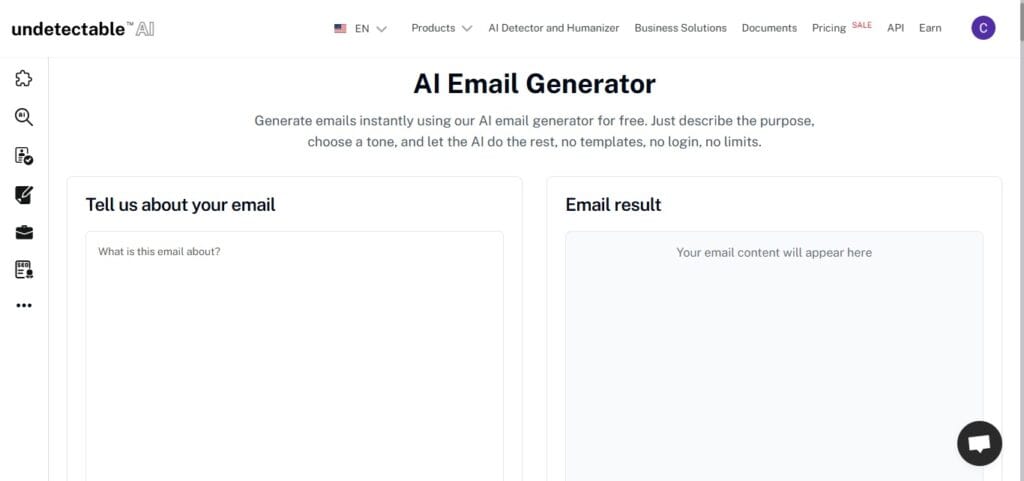
To ensure your tracked emails don’t just reach the inbox but resonate with the reader, use Undetectable AI’s AI Email Generator to draft your messages.
It creates high-converting, human-like copy that avoids the “robotic” triggers of standard AI, ensuring your outreach feels authentic and bypasses common spam filters.
Try the AI Detector and Humanizer tools in the widget below!
Frequently Asked Questions
What is email tracking?
Email tracking is the process of monitoring outbound emails to determine whether recipients opened them, clicked links, or downloaded attachments.
Most tools use an invisible tracking pixel embedded in the message body. When the recipient’s email client loads that pixel, the sender receives a notification with open data.
Are email tracking tools legal?
Email tracking is legal in most jurisdictions. However, regulations like GDPR and CCPA impose requirements around consent and data handling.
Businesses in those regions should review privacy policies and consult legal counsel before deploying tracking at scale.
Can recipients detect email tracking pixels?
Yes, technically savvy recipients and certain email clients can detect or block tracking pixels. Apple Mail Privacy Protection preloads tracking pixels through proxy servers, making open data unreliable for Apple Mail users. Some browser extensions also strip tracking pixels from incoming messages.
What is the difference between email tracking and email analytics?
Email tracking monitors individual messages to report opens, clicks, and forwards. Email analytics aggregates data across teams or campaigns to reveal patterns in response times, email volume, and workload distribution. Some tools focus on one approach, while others combine both.
Do free email tracking tools work well enough for business use?
Free email tracking tools like HubSpot Sales Hub Free and MailTracker by Hunter provide reliable open and click tracking for individual users. However, free plans typically lack team-level analytics, advanced reporting, and CRM integrations that growing sales teams eventually need.
Does Apple Mail Privacy Protection break email tracking?
Apple Mail Privacy Protection preloads tracking pixels through Apple’s proxy servers, registering a false open regardless of actual reader behavior. This affects pixel-based open tracking for all recipients using Apple Mail on iOS 15 or later. Link click tracking remains unaffected.
Which email tracking tool is best for sales teams?
The best tool depends on the team’s primary goal. For individual prospect tracking with CRM integration, HubSpot and Streak are strong choices. For team-level performance monitoring, EmailAnalytics is purpose-built; for sales engagement automation, Mixmax offers the deepest feature set.
Conclusion
Choosing the right email tracking tool is ultimately a matter of aligning your specific goals with the right set of features, whether they involve individual outreach, team management, or high-volume sales.
If your primary objective is to gain high-level visibility into team productivity and drastically reduce response times, EmailAnalytics is the standout choice for managers.
For those who prefer to work entirely within the Gmail interface, Streak and Right Inbox offer the most seamless integration for CRM and productivity.
Meanwhile, high-growth sales teams will find the most value in Mixmax or HubSpot Sales Hub for their robust automation and sequence capabilities.
For freelancers or those on a strict budget, Mailsuite and MailTracker by Hunter provide reliable, lightweight tracking that proves you don’t need a massive budget to gain actionable insights into your sent folder.
Elevate your outreach by humanizing AI-generated text to ensure your emails land in the inbox and connect authentically with every recipient by trying Undetectable AI.