
Ever notice how some ChatGPT responses feel like they are written by a cold robot, while others flow like a natural conversation?
The difference is not magic; it is a method. After spending countless hours fine-tuning AI responses, we have learned that making chatgpt sound more human is not about complex prompts or technical wizardry. It is about understanding how this AI thinks and speaks.
A fascinating fact to study on human-AI interaction found that people are 40% more likely to follow advice from an AI when the tone feels conversational rather than clinical.
The secret is not technical tricks but rather learning how to guide the machine toward a more natural rhythm. It involves treating the AI as a collaborator rather than just a search engine.
When you learn to tweak the output, you bridge the gap between machine logic and human warmth.
This article explores seven practical ways to transform those stiff, predictable replies into something that actually resonates with your readers.
Key Takeaways
- Maintaining the original core message and emotional tone is the most critical step in ensuring that your content remains useful while sounding relatable.
- Systematically boosting clarity and flow requires applying essential techniques like paraphrasing and prioritizing an active voice.
- Undetectable AI offers specialized tools like the Humanizer and Style Replicator to bridge the gap between robotic drafts and professional, natural prose.
- Transparency and objectivity are vital because even the most natural-sounding AI should be guided by human oversight to ensure factual accuracy.
Why Does ChatGPT Sound Robotic Sometimes?
If you have ever felt like an AI response was just “too perfect,” you are noticing the mathematical predictability of how these models generate text. AI does not think in ideas; it thinks in probabilities.
It calculates which word is most likely to follow the previous one based on billions of pages of data. This often leads to a very safe, middle-of-the-road style that lacks the quirks and sudden shifts found in human speech.
Another reason for that robotic feel is the lack of personal voice. ChatGPT is designed to be helpful and neutral, which is great for a manual but terrible for a blog post or a personal email.


Never Worry About AI Detecting Your Texts Again. Undetectable AI Can Help You:
- Make your AI assisted writing appear human-like.
- Bypass all major AI detection tools with just one click.
- Use AI safely and confidently in school and work.
Common patterns that readers easily notice include an over-reliance on transitional words like “furthermore” or “moreover” and a tendency to summarize everything in a very neat, repetitive conclusion.
When every sentence has a similar length and structure, the reading experience becomes a monotonous drone that signals “bot” to the human brain.
What Makes Writing Sound More Human?
Natural tone
A natural tone feels like a bridge between the writer and the reader. It is casual where appropriate and serious when necessary, but it never feels forced.
To achieve this, the language should mirror how people actually speak during a productive meeting or a coffee chat. It avoids the stiff, over-polished vocabulary that machines default to.
Sentence variety
Human writers naturally vary their sentence lengths. We use short, punchy sentences to make a point. Then we might follow up with a longer, more descriptive one to provide context.
This creates a musical rhythm often called “burstiness” that keeps the reader engaged. AI usually produces sentences of very similar lengths, which kills the “vibe” of the piece.
Personal voice
Writing feels human when it has a soul. This means including specific opinions, unique observations, or even a bit of humor. A personal voice shows that there is a real person behind the keyboard who has lived through experiences and has a unique perspective to share on the topic.
Emotional nuance
Machines struggle with empathy. Human writing can be persuasive, encouraging, or even slightly frustrated.
Adding these emotional layers helps the reader connect with the message on a deeper level. It turns a list of instructions into a helpful piece of advice that feels like it comes from a place of genuine concern.
Imperfect phrasing
Sometimes, being “too correct” is a red flag. Humans use idioms, slang, and occasionally unconventional grammar to emphasize a point.
These minor “imperfections” actually make the text feel more authentic. It shows that the goal was communication and connection rather than just following a set of linguistic rules perfectly.
How the Machine Actually “Thinks” About Your Words
To truly master AI writing, it helps to look under the hood and understand why it speaks the way it does.
Think of ChatGPT not as a conscious brain, but as the world’s most advanced “predictive text” engine.
It doesn’t “know” facts in the way humans do; instead, it has analyzed millions of books and websites to learn the mathematical probability of how words are strung together.
When you give it a prompt, it is essentially playing a high-speed game of “guess what comes next” based on the patterns it has seen in its training data.
Language Model = Knowledge + Patterns + Context
Natural Sound = Guidance + Style + Purpose
This is why AI can sometimes sound repetitive or overly polite. It is programmed to choose the most likely, safest word in a sequence.
Because most human writing in its database is structured and formal, the AI defaults to that style unless you tell it otherwise.
It is trying to be a “perfect student” by following grammar rules to a fault, which is exactly what makes it sound like a machine. It lacks the “chaos” of human thought—the sudden shifts in tone, the slang, and the personal stories that we use to make a point.
The key to breaking this robotic cycle is providing “contextual constraints.” When you give the AI a specific persona or a detailed audience profile, you are narrowing down the pool of words it can choose from.
You are essentially telling the machine, “Instead of looking at all the text in the world, only look at how a friendly tech mentor would talk.” This forces the AI to use more specific language and natural transitions, bridging the gap between cold machine logic and warm human connection.
Understanding this logic allows you to move from being a casual user to a “prompt engineer” who can guide the machine toward genuine authenticity.
7 Practical Ways to Make ChatGPT Sound More Human
1. Be specific with your prompts
Instead of just asking for a “blog post,” give the AI a role. Tell it to act as a seasoned journalist with fifteen years of experience or a friendly neighbor giving gardening advice.
The more context you provide about who the AI is supposed to be, the more it can move away from its generic baseline.
Providing a clear direction for your AI prompts ensures that the output has a defined starting point and purpose.
2. Feed it your writing style
The most effective way to get natural results is to show the AI how you actually write. Paste a few paragraphs of your own work and tell the AI to analyze the tone, rhythm, and vocabulary.
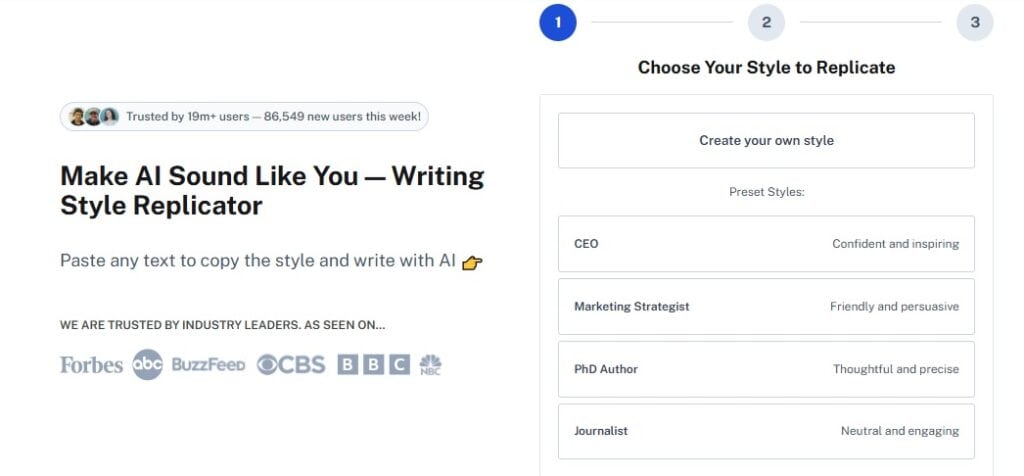
You can even use our Undetectable AI’s Writing Style Replicator to automate this process. It helps the machine learn your specific “brand voice” so the results match how you actually communicate.
3. Ask for a more conversational tone
Explicitly tell ChatGPT to avoid formal academic language. Use instructions like “write in a relaxed tone” or “use contractions like ‘don’t’ and ‘can’t’.”
This simple change breaks the stiff, textbook-like structure that AI defaults to and makes the text feel like it belongs in a real conversation.
4. Remove clichés and filler phrases
AI loves phrases like “in the fast-paced world of” or “at the end of the day.” These are conversational crutches that make the text feel repetitive.
Ask the AI specifically to avoid these clichés. Focusing on plain language in professional communication is a proven way to make your content more accessible and less like a generic machine draft.
5. Use follow-up prompts to refine output
Never accept the first result. If a paragraph feels too long, ask the AI to “break this up and make it punchier.” If a section feels cold, tell it to “add more warmth and a personal anecdote here.”
Iteration is the key to moving from a robotic draft to a humanized final product.
6. Break rigid sentence structures
Ask the AI to purposely vary the length of its sentences. You can tell it to “start three sentences with a verb” or “use a very short sentence after a long one for emphasis.”
This mimics the natural flow of human speech and prevents the reader from falling into a “trance” caused by repetitive patterns.
7. Always edit and personalize
The final 10% of the work should always be human. Go through the AI output and add a specific fact, a local reference, or a personal thought.
This “final polish” is what truly anchors the text in reality. By combining AI efficiency with your own unique insights, you create something that no machine could ever produce on its own.
Examples: AI vs Human-Like Writing
| Content Type | Basic AI Response | Humanized Version |
| Email Intro | I am writing to inform you that your request has been processed successfully. | Great news—your request is all set! I just finished processing it for you. |
| Blog Hook | In today’s digital era, productivity is vital for success in the workplace. | Let’s be honest: we’re all looking for a way to get through our to-do lists without losing our minds. |
| Product Description | This vacuum features high suction power and a long-lasting battery for cleaning. | This vacuum is a beast on pet hair, and the battery actually lasts long enough to finish the whole house. |
| Technical Guide | The algorithm optimizes response generation via statistical word prediction. | Think of the AI like a really fast translator that guesses the next word based on what it has seen before. |
How to Prompt ChatGPT for More Natural Results
- Use clear instructions: Instead of being vague, tell the AI exactly what to do. Say “Write a 300-word explanation for a fifth-grader” rather than just “Explain this.”
- Add tone guidance: Use descriptive adjectives like “gritty,” “whimsical,” or “authoritative but kind.” This gives the AI a mood to aim for.
- Provide examples: If you have an email or an article you love, show it to the AI. Say “Write the next section in the same style as this example.”
- Ask for revisions: If a response feels off, tell the AI why. “This sounds too much like a sales pitch; make it sound more like a helpful advice column.”
- Iterate outputs: Run the same prompt twice or ask for three different versions of the same paragraph. This gives you a variety of “voices” to choose from.
How to Train ChatGPT for Specific Audiences

Teaching an AI to speak to a specific group of people is like briefing a new employee. You need to provide the right background so the output doesn’t feel like a generic “one-size-fits-all” message.
Here is how to coach the machine to hit the mark every time.
- Start with an audience deep-dive Before you ask for a single sentence, describe exactly who you are talking to. Define their age, their professional background, and their specific “pain points.” If the AI knows it is talking to a busy small business owner rather than a corporate CEO, it will automatically adjust its vocabulary and level of formality to be more helpful and less intimidating.
- Create a communication style guide Don’t just say “be professional.” Instead, provide a mini-handbook. Tell the AI to “avoid exclamation points” or “always lead with the most important information.” By setting these ground rules, you prevent the machine from defaulting to its usual polite but bland persona, ensuring the voice stays consistent with your brand’s unique identity.
- Test with sample conversations The best way to see if your training is working is to run a few “trial runs.” Ask the AI to write a short email or a quick social post for your specific audience. If the tone feels off, you can correct it in real-time. This back-and-forth process helps the model narrow down the specific linguistic “vibe” you are looking for before you start generating long-form content.
- Refine based on feedback When the AI gets something right, tell it. When it misses the mark, be specific about why. Saying “this sounds too salesy, try making it more educational” helps the model adjust its internal weights for that specific chat session. Over time, the AI learns which phrases to prioritize and which ones to avoid for your particular crowd.
- Document successful prompts Once you find a formula that works, save it. Keep a “prompt library” where you store the specific instructions that resulted in the most human-like and effective responses. This allows you to recreate successful results instantly in the future without having to start the coaching process from scratch every time you open a new chat window.
By following this structured approach, you turn the AI into a specialized communicator that understands the nuances of your niche.
The more effort you put into the initial setup, the more natural and effective the final results will be for your readers.
Common Mistakes That Make AI Writing Obvious
- Repetitive phrases: Machines often start multiple sentences in a row with the same word, such as “This” or “It.”
- Overly formal tone: Using “shall” or “therefore” in a casual blog post is a quick way to signal that a bot wrote the text.
- Lack of personality: If the writing doesn’t take a stand or show any emotion, it feels like it was written by a committee.
- Predictable structure: Following a perfect “Intro-Point 1-Point 2-Point 3-Conclusion” format every single time feels formulaic.
- No variation: A lack of slang, idioms, or cultural references makes the text feel like it exists in a vacuum.
For Smarter AI Writing: Use Undetectable AI Tools
If you want to take your content to the next level, you need more than just good prompts.
You need a suite of tools designed to refine the technical DNA of your writing and ensure it mirrors your unique perspective.
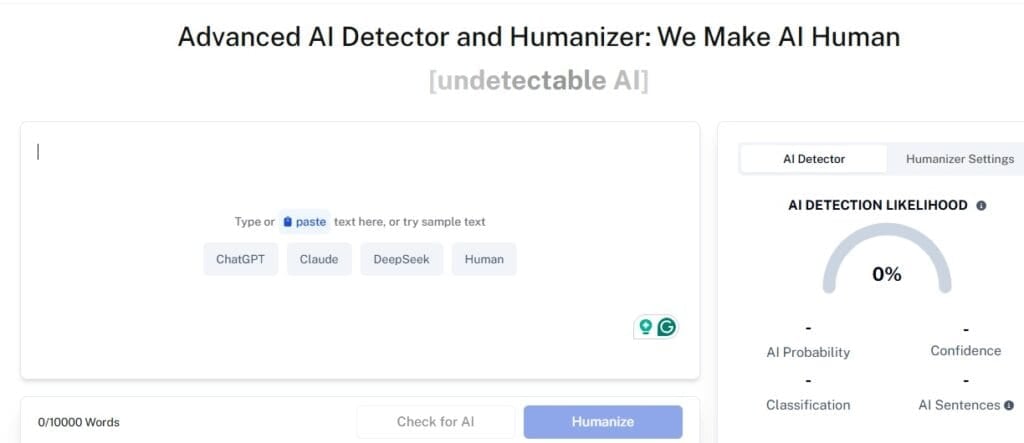
- Humanize AI Text: Our AI Detector and Humanizer allows you to take a basic ChatGPT draft and transform it into something that reads naturally. It reconfigures the rhythm and word choice to ensure your work bypasses robotic signatures while staying engaging.
- Undetectable AI’s Writing Style Replicator: One of the most effective ways to stay authentic is to teach the AI how you actually speak. Our Writing Style Replicator analyzes your existing work to learn your specific tone, rhythm, and vocabulary. This ensures that every piece of AI-assisted content sounds like it came directly from your desk, not a generic server.
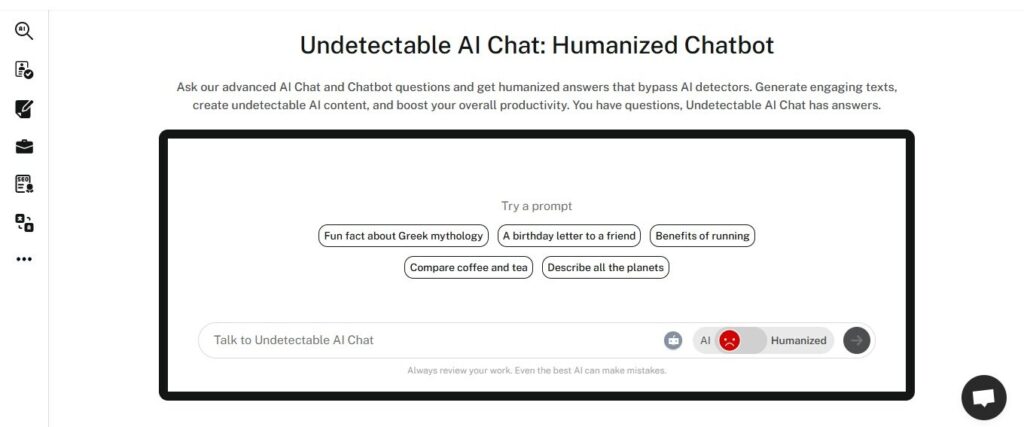
- Improve Flow: By using our AI Chatbot features, you can engage in a back-and-forth dialogue that feels much more like a collaboration than a command line, resulting in more fluid responses.
- Reduce Patterns: The tools identify the predictable statistical loops that machines fall into and help you break them, ensuring your content has the “burstiness” that human readers expect.
- Enhance Tone: You can fine-tune the formality and purpose of your text, making it easy to switch from a professional report to a friendly social media post without losing quality.
- Final Polish: Once you have your humanized draft, a final check ensures that your message is clear, accurate, and ready to connect with your audience.
Check your content using our AI Detector and Humanizer below!
FAQs
Can ChatGPT truly sound 100% human?
It can get very close with the right prompts and human editing, but its goal is to be a helpful assistant. The “human” part always comes from your guidance and final touch.
What is the best prompt for a human tone?
Try: “Write in a conversational, engaging tone. Use varied sentence lengths and avoid corporate jargon. Speak directly to the reader like a mentor.”
Does using an AI humanizer help with SEO?
Yes. Search engines prioritize helpful content written for people. Making your AI text sound more human often results in better user engagement and higher rankings.
Why does AI use so many clichés?
Because clichés are common in its training data. They are statistically likely patterns, which is why you have to specifically tell the AI to avoid them.
How can I test if my AI writing sounds human?
Read it out loud. If you find yourself tripping over stiff words or getting bored by the rhythm, it needs more humanizing.
Conclusion
Making ChatGPT sound more human is an art that combines technical understanding with intuition. By focusing on sentence variety, personal voice, and specific prompting techniques, you can turn a robotic output into a meaningful conversation.
The goal is not to hide the use of technology, but to ensure that the final message is warm, relatable, and easy to understand.
As the line between machine and human prose continues to thin, the writers who master this collaboration will be the ones who truly stand out.
Explore Undetectable AI to refine your writing and ensure your work stays human and impactful.