
Open any social media app right now and count how many seconds pass before you encounter a block of plain text with no image attached to it. I’m sure you’ll be waiting a long while!
The internet is, overwhelmingly and irreversibly, a visual medium.
An estimated 14 billion images are shared daily across social media platforms. Google Image Search currently indexes an estimated 136 billion images, and experts say that number could reach 382 billion by 2030 with the current pace of image creation.
Among all these images, finding a genuinely useful, correctly licensed one, the one that actually shows what it claims to show, is a really difficult job.
In this article, you will learn:
- What image search is and its various forms
- Practical guidance on using advanced image search techniques effectively
- How to protect yourself from fake images online
Key Takeaways
- Useful image search results depend on how specific your keywords are, the platform you search on, and the filters you use for resolution and usage rights
- An average person encounters a lot of misinformation on their social media feeds, for which reverse image search is an underused tool.
- You can find free, high-quality images at Creative Commons licensing, Openverse, public domain collections from the Smithsonian, the Metropolitan Museum, the Library of Congress, etc.
- Undetectable AI image detector used alongside reverse search and metadata inspection provides strong verification against AI-generated images.
What is an Image Search Technique?
An image search technique is any method that allows a computer system to find and retrieve information based on visual content.
When researchers first started exploring image search techniques back in the early 1990s, their approach was laughably simple by today’s standards.
Christel Faloutsos and his colleagues at IBM were the founders of Query By Image Content in 1994.


Never Worry About AI Detecting Your Texts Again. Undetectable AI Can Help You:
- Make your AI assisted writing appear human-like.
- Bypass all major AI detection tools with just one click.
- Use AI safely and confidently in school and work.
QBIC could search image databases using color, texture, and shape. A red circular object would match other red circular objects. That was, more or less, it.
Currently, image search includes a surprisingly wide range of approaches:
- Text-based image search, where you type keywords and retrieve images tagged with matching metadata, essentially what Google Images started with
- Content-Based Image Retrieval, or CBIR, which analyzes the visual content
- Reverse image search, in which you provide an image to Google Lens and TinEye and ask the system to find visually similar ones
Using Reverse Image Search Effectively
The basic mechanism for reverse image search is quite simple.
All you have to do is feed the system an image, either by uploading a file or, in Google Lens’s case, literally pointing your phone camera at something in the physical world.
It will analyze the visual content and return you the results that are visually similar or contextually related to your image.
But how do you really make these image similarity search techniques work better?
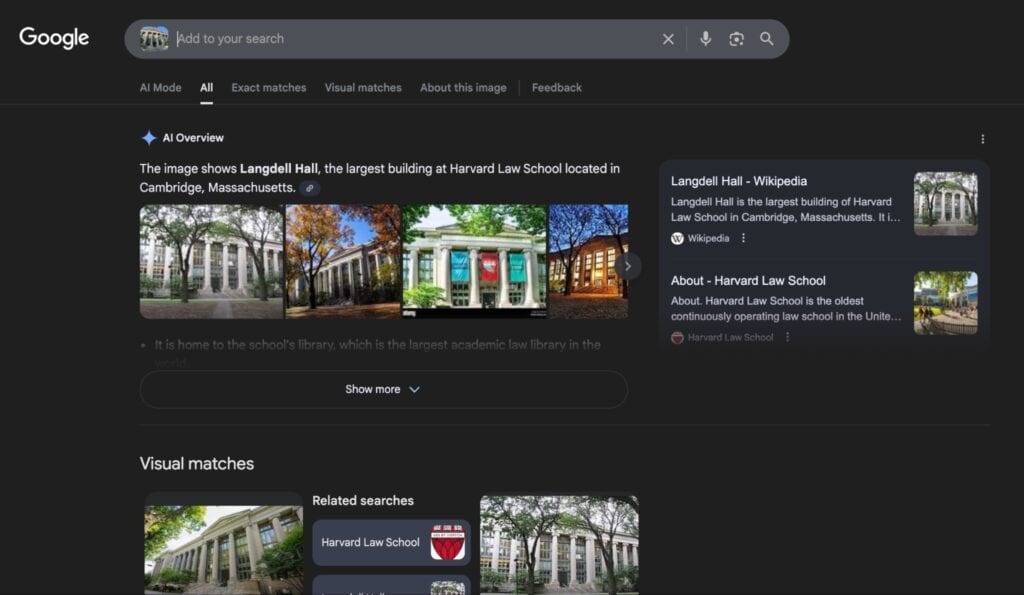
Google Lens is arguably the most useful tool for consumer products, landmarks, and anything that’s likely to have a significant web presence.
Here’s the result of Google Lens when we provided it with the image of the Harvard Law building:
TinEye was purpose-built for tracking image origins. It’s been indexing images since 2008 and has accumulated over 62 billion images in its database as of recent counts.
Yandex Images tends to work best on facial recognition and on images that are more prevalent in non-English web spaces, Eastern European in particular.
A 2022 cybersecurity study conducted a rigorous black-box comparison of these platforms and found their reverse image search accuracy to be:
- Google: 65%
- Bing: 55%
- Yandex: 50%
Many times, your image of interest will have a lot of visual noise. For instance, a busy background, multiple objects, people standing around the thing you want to focus on in your search.
So make sure to crop to the specific subject you want to investigate so that the system also doesn’t get confused.
Tips for Finding High Quality Images
A few deliberate adjustments to how you search and what you filter for can produce you much better images than a generic search.
- Use clear search keywords
The specificity of your search terms has a direct impact on the results you get.
Search engines match images to queries largely through associated metadata and surrounding text. Research on keyword-based image retrieval has shown that explicit and precise keyword queries retrieve more relevant results.
Try to think of your target image in layers. Beginning with the subject and then adding descriptors for style, setting, mood, lighting, and intended use.
Also, institutional archives like museums or universities, and dedicated stock photo platforms provide you with different kinds of images than a general web search.
If you’re after a historical photograph, Google Images is probably not the best tool to get them. The Library of Congress, Europeana, or the Smithsonian’s open-access collections are far more likely to get you what you need.
- Filter by image resolution
Resolution, in simplest terms, is the dimension of an image. It is possible that an image looks fine at thumbnail size but turns into a pixelated mess when printed.
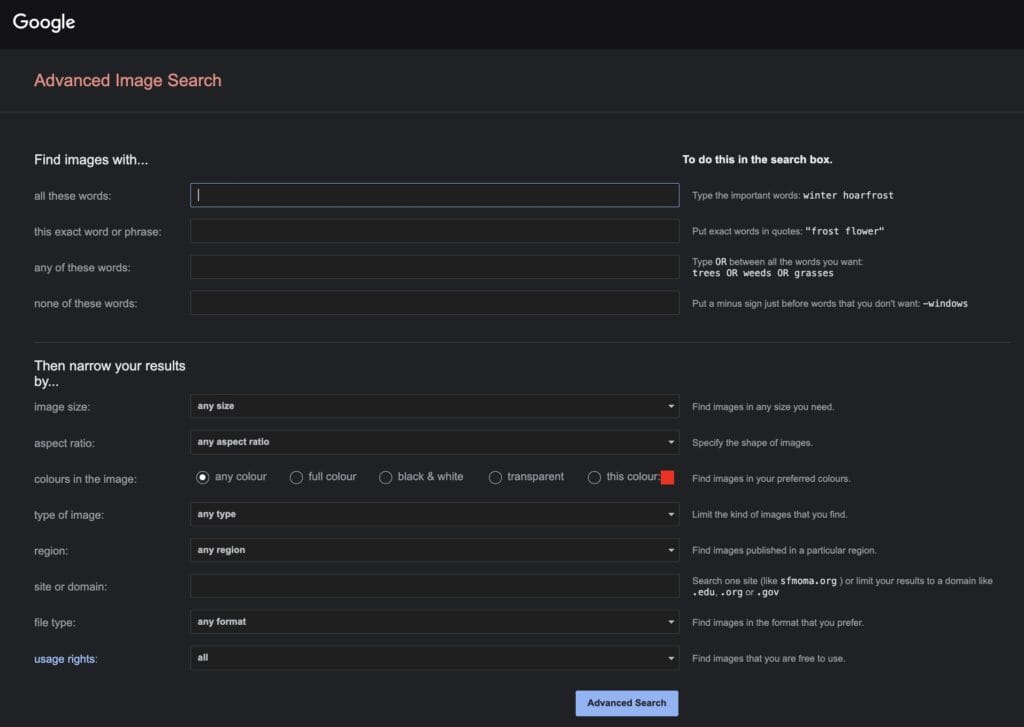
You can filter the size of your image of interest with built-in search features in almost all image search tools. Google Images’ Advanced Search, for example, allows you to filter results by size, format, usage rights, and many other parameters.
On Google Images, you can access these filters under “Tools” once you’ve run an initial search. Or, simply click here to try it out.
Search platforms specific to images, like Unsplash, Pexels, and Adobe Stock, are built around high resolution as a baseline. You’re unlikely to find anything below a usable threshold there.
The resolution you need is very much dependent on your use case for the image.
- 72 DPI, or anything above 1000 pixels, is the standard resolution for web use
- For a full-page print of an image, you want at least 300 DPI, or upward of 2500 x 3500 pixels
The JPEG format is fine for the most part. If you need an image with a transparent background, PNG or TIFF will preserve more data.
- Check copyright or usage rights
Finding an image and being able to use it are entirely different things.
According to DMCA tracking data, images account for 23% of all copyright-related takedown requests, the single largest category of individually targeted content type online.
The safest place to get usable images is to search in places where usage rights are explicit from the outset.
Creative Commons licensing exists on a spectrum from “free for any use” to “attribution required” to “non-commercial only.”
The Creative Commons search tool, now called Openverse, lets you filter your search according to the type of license. You can find images that match your needs without having to worry about permissions.
Many public domain image collections from institutional archives are widely available and free to use.
The Metropolitan Museum of Art has over 490,000 high-resolution images in its public domain collection, all available for download and reuse without restriction.
As a matter of fact, Google Images Advanced Search also allows you to filter your images based on “usage rights.”
How Undetectable AI Improves Image Search
The gap between what people want to find and what they actually search for has long been a recognized problem in information retrieval.
Most users don’t really know how to construct specific search queries. You can use Undetectable AI chat to help you find the right keywords describing the images you have in mind before you go to an image search tool.
Another problem we face with images is whether or not they are real. A large-scale study published on arXiv analyzed approximately 287,000 image evaluations from over 12,500 participants around the world.
It found that humans had a success rate of only 62% when trying to distinguish AI-generated images from real ones.
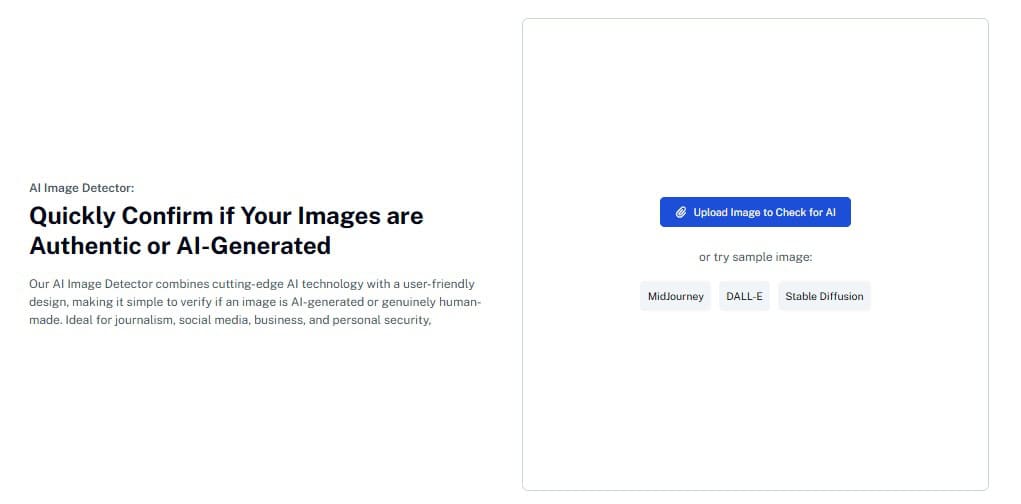
Undetectable AI Image Detector runs an analysis at a pixel level to look for patterns in texture, noise, color saturation, and structural artifacts statistically associated with generative AI output.
The detection is based on pixel content rather than metadata. So, if an image’s metadata has been stripped and no watermark is present, you would still be able to catch its AI origin.
It’s compatible with all of the following image generators:
- DALL-E
- Stable Diffusion
- MidJourney
- Ideogram
- Flux
- Bing Image Creator
- GANs
- Nano Banana (Google DeepMind)
- Seedream
- Adobe Firefly
Avoiding Fake Images Online
Estimates suggest that over 500,000 deepfakes were shared on social media in 2023 alone. And that’s just the synthetic variety.
It doesn’t account for the far larger volume of real photographs deliberately stripped of context or recycled from old events to misrepresent current ones.
According to NewsGuard, which tracks misinformation sources, the number of AI-enabled fake news sites increased tenfold in 2023, and it’s only been growing in 2026.
When people search for images related to breaking news, these fake, manipulated images are often among the most circulated, and therefore among the most indexed.
So, any time you come across a strong reaction-provoking image, always reverse search it to see when it was first used, in what context it was used, the source of the photo, and whether that source is credible.
We also have a helpful guide on how to tell if an Image is AI-generated or fake.
When an image is edited and resaved, the manipulated areas compress differently from the original sections. It can be detected through the Error Level Analysis (ELA) technique using the free web tool, FotoForensics.
Practical Uses for Image Search
Image search has way more uses than you can think of. Here are some of the practical uses for image search:
- If you’ve seen a jacket you want but have no idea what it’s called or who makes it, uploading a photo is infinitely more direct than trying to describe it in keywords. Visual search users convert at 30% higher rates compared to traditional text search users in online shopping.
- In healthcare, content-based medical image retrieval systems help clinicians search radiology and pathology databases for visually similar cases.
- The entire career of journalists runs on fact-checking. The Global Investigative Journalism Network has formalized image search as a key verification tool in journalism. It is used to trace the provenance of photographs, identify people in images, locate the original context of a scene, cross-reference visual evidence across multiple sources, etc.
- Google developed SpeciesNet, an open-source AI model used to identify wildlife in camera trap images. It helps wildlife conservation efforts by automating species identification from images.
- You can also use AI Image Detection to detect plagiarism in visual work in academic contexts.
Enhance your work with our AI Detector and Humanizer—start below!
Final Thoughts
Image search tools exist on everyone’s phone. Google Lens alone now handles 20 billion searches monthly, having grown from 10 million daily uses in a relatively short period.
The advanced and reverse image search techniques explained in this article should help you extract value from the tools you have in your hands.
Also, being able to differentiate an AI-generated image from a genuinely human-created one is a basic literacy skill for everyone, especially when we are living in this AI-dominated world.
Our Undetectable AI analyzes noise patterns, compression artifacts, color saturation, and frequency-domain signals to help you stay away from fake images online.
Give it a try today!