
Interestingly, recent data highlights a growing tension in the modern workplace.
While many expected automation to simplify our lives, reports show that AI has not yet reduced workloads but is actually straining employee capacity, with time spent on communication and emailing doubling as deep focus work has significantly declined.
This shift makes the consolidation of artificial intelligence into a single, organized workspace like Notion a highly attractive prospect for those desperate to reclaim their time from fragmented digital noise.
Whether you are a student managing projects, a freelancer organizing client deliverables, or a small business team seeking efficiency, this smart augmentation changes the game.
This review explores how the tool works and how you can fit it into your daily life to significantly improve your output.
Let’s dive in.
Key Takeaways
- Notion AI is an integrated workspace companion that allows users to generate, summarize, and edit content without ever leaving their primary note-taking environment.
- Productivity is boosted through automated organization as the tool can instantly turn messy meeting notes into structured action items and clear deadlines.
- The pricing model is an affordable add-on compared to standalone AI services, making it a cost-effective choice for those already using the base platform.
- Undetectable AI provides a necessary quality check for users who need to humanize AI-generated drafts to ensure they resonate with a human audience and maintain a natural flow.
- Privacy and context awareness are major strengths because the tool can answer questions specifically about the data stored within your private pages.
What Is Notion AI and Why Everyone’s Talking About It
Notion AI is an augmentation that turns a standard productivity platform into a smart, collaborative workspace.
While traditional tools require you to copy and paste text between a browser and a document, this system lives directly inside your pages. It is designed to enhance writing, organization, and technical execution by automating the tedious parts of the creative process.
It has become a favorite among students who need to synthesize lecture notes and teams that want to streamline project planning.


Never Worry About AI Detecting Your Texts Again. Undetectable AI Can Help You:
- Make your AI assisted writing appear human-like.
- Bypass all major AI detection tools with just one click.
- Use AI safely and confidently in school and work.
By combining note-taking with generative capabilities, it eliminates the “context switching” that usually kills focus during a deep work session.
The popularity of the tool stems from its ability to act as a second brain. It does not just provide a blank canvas; it provides a collaborator that understands the context of your previous entries.
This is why writers and developers are increasingly moving away from disconnected apps and toward an all-in-one ecosystem.
Instead of just managing tasks, you are now managing knowledge with the help of a machine that can retrieve information, translate languages, and suggest new ideas in real-time.
Quick Review of Notion AI
- One-Glance Functionality: It drafts emails, summarizes long documents, fixes grammar, and answers specific questions about your data.
- Best For: Freelancers managing multiple clients, university students with heavy research loads, and project managers in remote teams.
- Key Strengths: Seamless integration, rapid response times, and a very intuitive command system using the “/” key.
- Main Limitations: It can sometimes struggle with very ambiguous or poorly phrased prompts and lacks the deep conversational memory found in specialized chat-based models.
For a deeper analysis, TheBusinessDive tested Notion extensively and shared a detailed Notion review covering its features, pricing, strengths, limitations, and real-world use cases
How Does Notion AI Work?
AI Prompts and Commands Inside Notion
The tool operates primarily through a command-driven interface. By simply typing “/ai” or hitting the spacebar on a new line, you trigger a menu of options.
You can give it direct instructions like “Write a press release for a new app launch” or “Create a table of pros and cons for remote work.”
Because it is part of the editor, the output is generated directly on the page, allowing you to format it immediately using the standard blocks.
This tactile approach makes it feel more like a writing assistant and less like a separate software program.
How It Processes and Generates Content
Under the hood, the system utilizes advanced large language models to process your requests. It analyzes the text you have already written to ensure the new content matches the established tone and subject matter.
This is particularly helpful when you ask it to “Continue writing” a paragraph you started. It looks at your vocabulary and the surrounding context to provide a seamless addition that feels like a natural extension of your thought process.
Integration With Notes, Docs, and Databases
One of its most advanced features is the ability to interact with databases. You can set up a database for your project tasks and use the AI to auto-populate summaries or status updates for each entry.
This level of integration ensures that your high-level planning is always supported by the raw data you have collected.
It turns static documents into dynamic assets that update as your project evolves, making it much easier to keep everyone on the same page during a busy quarter.
Limitations of AI-Generated Outputs
While the generation is impressive, it is not infallible. It can occasionally produce “hallucinations” or factual errors, especially when dealing with very recent news or obscure technical topics.
Furthermore, the prose can sometimes feel a bit repetitive if you don’t provide specific instructions on the desired style.
Users should treat the output as a first draft that requires human oversight and a final polish to ensure absolute accuracy and a unique voice.
Key Features of Notion AI You Should Know
| Feature | Primary Benefit | Best Use Case |
| Writing & Editing | Fixes spelling and adjusts tone. | Refining professional emails or reports. |
| Summarization | Turns long pages into bullet points. | Reviewing long-form research or meeting transcripts. |
| Task Automation | Generates to-do lists from text. | Transforming brainstorming sessions into plans. |
| Smart Templates | Pre-fills complex page structures. | Setting up recurring content calendars. |
| Q&A Search | Finds info across all your pages. | Retrieving specific project details from months ago. |
How to Use Notion AI: A Simple Walkthrough
Step 1: Getting Started With Notion AI
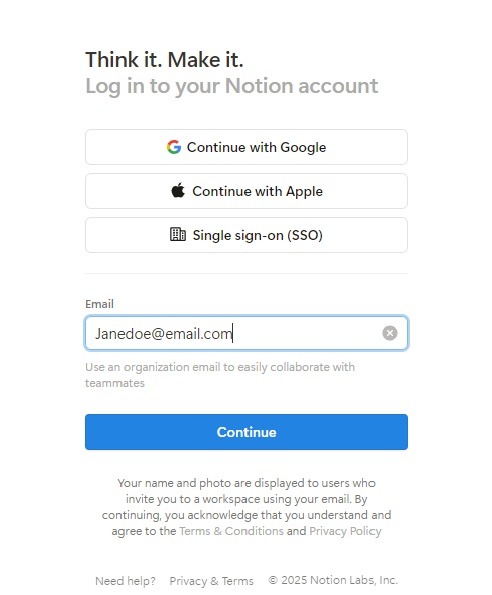
First, log in to your account and ensure that the AI feature is enabled in your settings. You can find this under the “Settings & Members” tab.
Once active, you can open any existing page or create a new one.
The simplest way to start is by clicking on a blank line where you will see the “Press space for AI” prompt. This is your gateway to the generative menu.
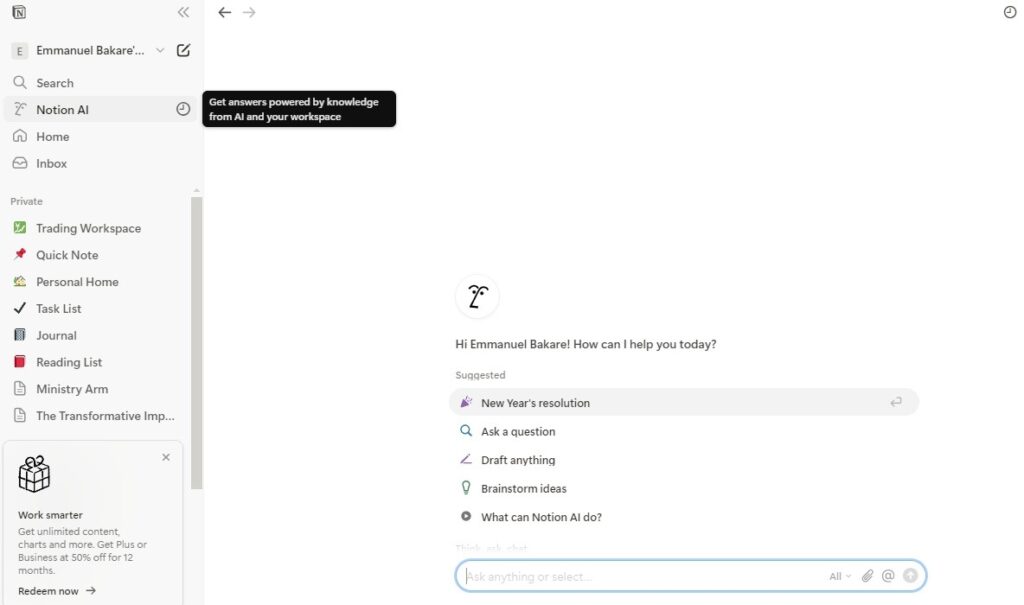
Step 2: Writing and Editing Content
If you have an existing paragraph that feels a bit clunky, highlight it and select “Ask AI.” You can choose options like “Improve writing” or “Change tone to professional.”
The system will generate a revised version right above your original, allowing you to compare and replace it instantly. This is the fastest way to polish a rough draft before sharing it with a colleague or client.
Step 3: Using AI for Notes and Summaries
After a long meeting, your notes are likely a mess of disorganized thoughts. Use the “Summarize” command to create a high-level overview.
You can also use the “Find action items” feature, which scans your text for verbs and deadlines to create a checklist. This ensures that the most important parts of the conversation are not buried in a wall of text.
Step 4: Automating Tasks Inside Your Workspace
You can incorporate AI into your database properties. For example, in a “Reading List” database, you can add an “AI Summary” property that automatically generates a blurb for every link you save.
This turns a simple list of bookmarks into a curated library of knowledge that you can skim through in seconds.
Step 5: Creating Content From Scratch With Prompts
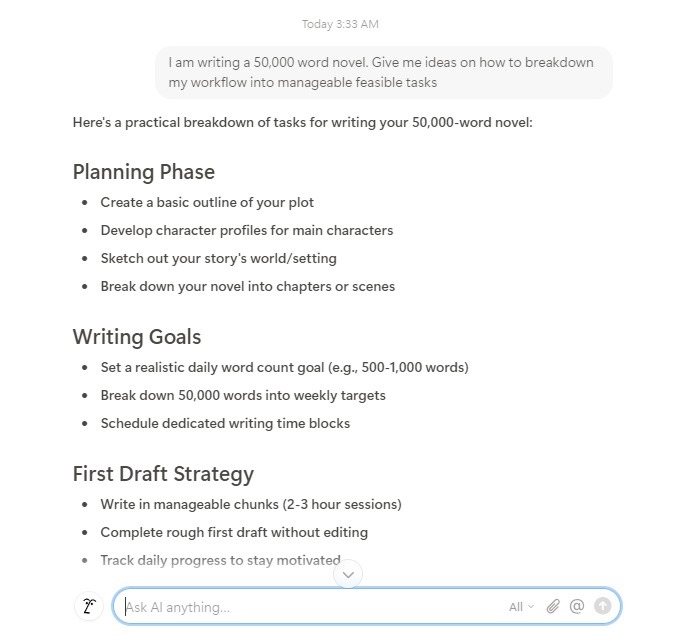
When faced with a blank page, use the prompt feature to build a foundation. If you need a blog post outline, type “Create a structured outline for a blog about sustainable architecture.”
The tool will provide the H2 and H3 headings, along with brief bullet points for each section. This effectively cures writer’s block by giving you a roadmap to follow.
Step 6: Editing and Refining AI Output
Always remember that the AI is your assistant, not your replacement. After it generates a report or a list, go back through and add your personal insights.
Use the “Make longer” or “Make shorter” commands to fine-tune the length until the document feels balanced.
Professionalism relies on this “human-in-the-loop” approach to ensure the final product meets high quality standards.
Types of Content You Can Create With Notion AI
- Blog posts and outlines: Generate engaging introductions and logical structures for your website content. According to recent search engine marketing data, search engines prioritize helpful content that shows expertise, so use the AI to outline and then add your own unique experience.

- Meeting notes and summaries: Quickly distill hour-long transcripts into the most important takeaways and specific project deadlines.
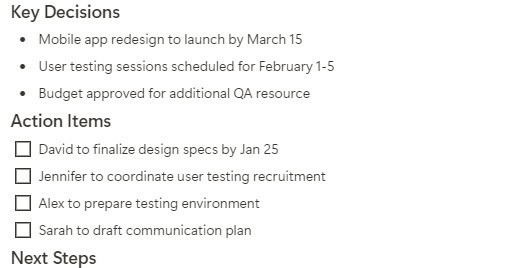
- To-do lists and productivity systems: Build comprehensive task managers that stay updated based on the notes you enter during the day.
- Email messages on Notion: Draft professional outreach, internal announcements, or difficult client replies in a fraction of the usual time.
- Study guides and research notes: For students, the tool can turn a semester’s worth of messy data into a clean, searchable guide for finals.
- Social media drafts and content ideas: Brainstorm a month’s worth of Instagram captions or LinkedIn posts based on a single theme or product launch.
Notion AI Pricing: Is It Worth the Cost?
Free vs. Paid Features
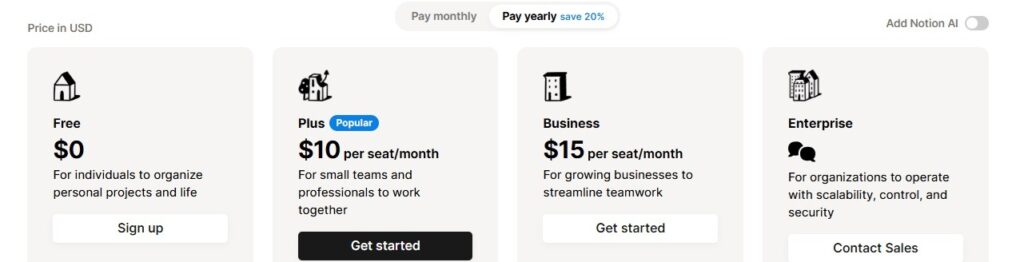
| Tier | Features | Price |
| Notion Free | 20 complimentary AI responses for testing. | $0 |
| AI Add-On | Unlimited AI usage across all pages. | $10 per member/month |
| Notion Plus | Enhanced guests and 30-day page history. | $10/month (Base) |
What You Get With the AI Add-On
The add-on provides unlimited access to the generative and analytical tools. This is essential for power users who rely on the tool daily for summaries and drafting.
It also includes the Q&A feature, which is perhaps the most valuable part of the package as it allows you to search through your entire history using natural language queries.
Pricing Compared to Other AI Tools
At $10 per month, it is significantly cheaper than a standalone ChatGPT Plus subscription, which currently costs $20. While it may not be as “chatty” as GPT-4, the value lies in its location.
You aren’t just paying for an LLM; you are paying for an LLM that is already integrated into your existing documents.
Value for Individuals vs. Teams
For solo freelancers, the $10 investment usually pays for itself in time saved within the first week.
For teams, the value increases because the AI can analyze shared pages, making it easier to onboard new members by allowing them to “ask” the workspace about previous project decisions.
Tips to Get the Most Out of Notion AI

- Write Clear and Specific Prompts: Instead of saying “Write a post,” say “Write a 500-word blog post in a casual tone about the benefits of solar energy for urban homeowners.”
- Use AI as a помощник, Not a Replacement: Always review the facts. The tool is a brilliant editor and brainstormer, but you are the subject matter expert who must vouch for the content.
- Combine AI Output With Your Own Editing: Use the tool to generate the “skeleton” of a report and then fill in the “meat” with your proprietary data and personal anecdotes.
- Build a Checklist to Evaluate AI-Generated Content: Before publishing, check for repetitive phrasing, factual accuracy, and tonal consistency across all paragraphs.
- Experiment With Different Use Cases: Try using it for things you wouldn’t expect, like summarizing a recipe from a long webpage or rewriting a complex legal clause into plain English.
Notion AI and Alternatives
The productivity landscape is crowded with options, but few offer the same level of deep integration.
Tools like Jasper AI are fantastic for marketing teams that need high-volume copy, but they don’t have a built-in document management system.
Similarly, ChatGPT is a more powerful conversationalist, but it doesn’t know what is written in your private project tracker unless you manually paste it in.
The decision to choose this tool over others usually comes down to where you spend your time. If your “home base” for work is already inside these pages, adding the AI is a logical step.
However, if you only need a tool for occasional creative writing, a standalone chatbot might suffice. The key difference is that productivity platforms are becoming smarter, moving away from simple text storage and toward active knowledge management.
Using Undetectable AI to Refine Notion AI Output
While the integration is seamless, the content generated by AI can sometimes carry a robotic or repetitive signature.
This is particularly problematic if you are writing blog posts or public-facing documents where authenticity is key to building trust with your audience.
To solve this, you can use specialized tools to give your AI-assisted work a more human finish.
Humanizing AI-Generated Content
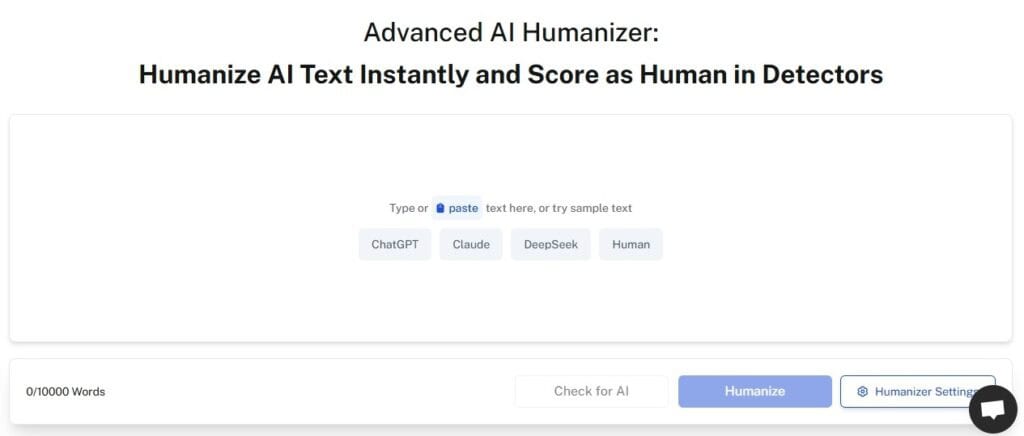
By passing your drafts through our Undetectale AI’s AI Humanizer, you can strip away the predictable machine patterns.
This ensures your content reads naturally and possesses the subtle variabilities found in human prose, which is essential for bypassing filters and connecting with readers on an emotional level.
Improving Tone and Natural Flow
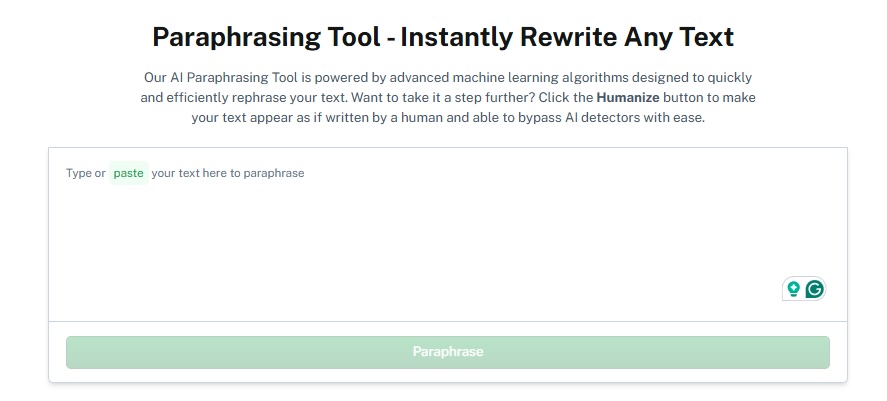
If a section of your report feels a bit “stiff,” you can use our Undetectable AI’s Paraphrasing Tool to reword the sentences.
This maintains the original meaning while introducing a more fluid rhythm, making the text much more engaging for a professional audience.
Reducing Repetitive or Detectable Patterns
AI often uses similar sentence lengths and structures. Using our Word Counter and Grammar Checker in tandem with humanization tools allows you to spot and fix these patterns.
This makes your work ready for publishing in high-stakes environments where quality and originality are non-negotiable.
Give our AI Detector and Humanizer a try in the widget below!
FAQs
Is Notion AI secure for my private data?
OpenAI’s models power much of the system, but the company states that your data is not used to train their public models. However, always review your company’s privacy policy before uploading highly sensitive proprietary information.
Does Notion AI work on mobile?
Yes, you can trigger the features on the iOS and Android apps by using the toolbar above the keyboard. It is a great way to summarize long notes while on the go.
Can I use Notion AI to write code?
Yes, it is surprisingly good at generating snippets for Javascript, Python, and even complex SQL queries for your databases.
Conclusion
Notion AI merges creativity and organization into a single, cohesive experience. It helps professionals focus on the tasks that actually matter by handling the heavy lifting of summarizing notes, preparing outlines, and retrieving data.
Whether you are a power user or just getting started with the suite of apps, it is a tool that significantly ramps up your efficiency.
To truly take your work to the next level and ensure your voice remains authentic, explore the solutions offered by Undetectable AI to humanize and polish your final drafts.