
If Google could DM you, it would say:
“Hey. I watched your video. I understood it, and wanted to rank it. But you gave me nothing to work with. No transcript. No structure. No text. I couldn’t find the long-tail keywords from transcripts that my users are searching for, so I ranked someone else. Sorry.”
Don’t make Google apologize again.
By providing a structured transcript, you aren’t just adding text, you’re giving search engine the source code it needs to promote you.
Don’t worry.
That’s exactly what we are covering in this blog. You are about to discover how to stop leaving your rankings to chance.
In this blog, we’ll learn how to capture massive organic traffic from video content, the step-by-step process of how to use video transcripts for SEO, and how to turn your spoken words into high-ranking long-tail keywords from transcripts.
Let’s dive in.
Key Takeaways
- Google now treats transcripts as a primary data source for AI-generated summaries (SGE).
- Transcripts allow you to skip manual keyword research by using the exact phrases you already spoke.
- You naturally use high-intent synonyms when speaking, which helps you capture niche traffic competitors miss.
- A single video can become a blog, an FAQ, and social snippets using a unified video SEO strategy 2026.
- Transcripts lower bounce rates by serving the sound-off mobile crowd and hearing-impaired users.
What Is Video Transcript SEO Potential
We’ve officially hit the era of Multimodal AI. This means that search engines are finally learning to think like us.
Instead of just scanning text, AI (specifically Google’s Search Generative Experience (SGE)) now processes video, images, and audio simultaneously.
To stay ahead, your video SEO strategy 2026 must prioritize text-based data. Even though AI can see your video, it relies on your transcript to verify your expertise.


Never Worry About AI Detecting Your Texts Again. Undetectable AI Can Help You:
- Make your AI assisted writing appear human-like.
- Bypass all major AI detection tools with just one click.
- Use AI safely and confidently in school and work.
- Feeding the AI Answer Engine
We’ve moved past the days of scrolling through blog links.
Most users now get their answers directly on the search results page via AI-generated summaries (like Google’s Gemini overlays).
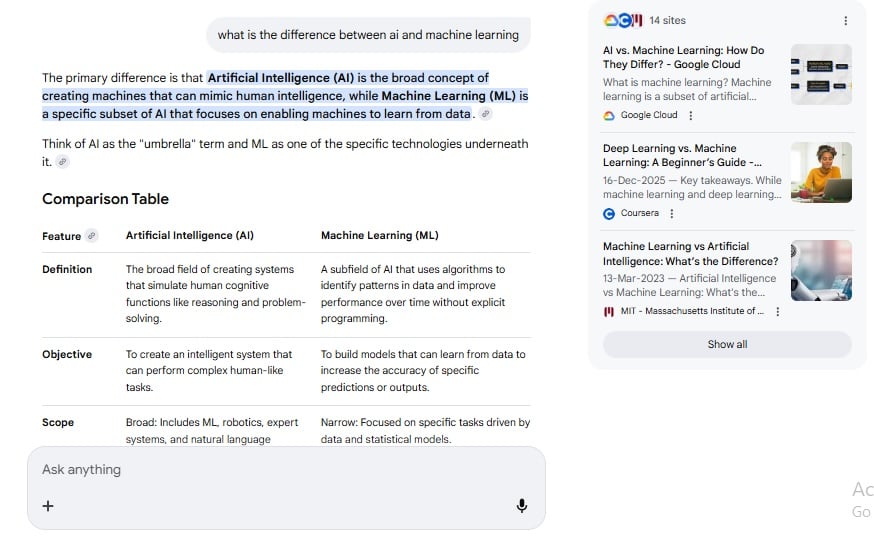
When you understand how to use video transcripts for SEO, you provide clean, high-quality data that AI models use as a primary source. Even without a click-through, your brand becomes the cited authority.
2. Owning the Key Moments and Rich Snippets
Google loves efficiency. If your transcript is structured well, search engines automatically generate Key Moments (those little timestamps you see in video results).
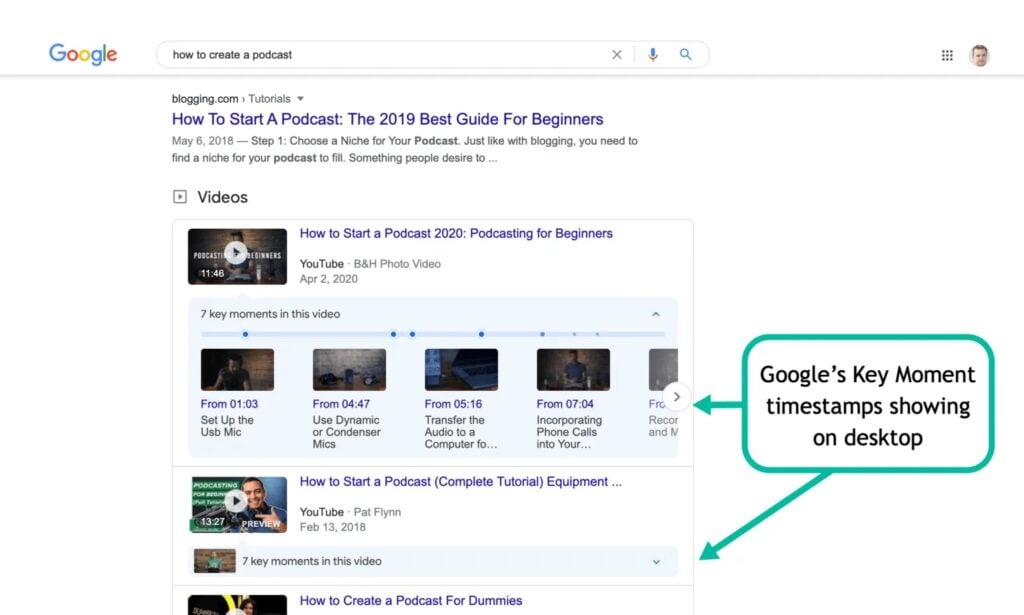
| The Feature | How Transcripts Do the Heavy Lifting | Why the User Cares |
| Jump-to-Section | Breaks your video into specific, searchable sub-topics. | They get their answer in 5 seconds, not 5 minutes. |
| Video Previews | Provides the text for those auto-captions in search feeds. | People can “watch” on mute while in a meeting or on a train. |
| Contextual SGE | Feeds the AI precise data points for complex queries. | You show up in hyper-specific, “niche” searches. |
3. Capturing The Voice Search
Remember how we used to type? “Best pizza NYC.” Nobody talks like that anymore.
In 2026, we’re talking to our phones like they’re friends: “Hey, where can I find a thin-crust place nearby that’s open past midnight?”
This is where transcripts shine.
Because they capture natural human speech, they naturally include the long-tail keywords and conversational phrases that people actually use.
It’s the perfect bridge between stiff, formal web copy and the way humans actually communicate.
4. Accessibility as a Modern Ranking Factor
At the end of the day, search engines reward user-first content. Providing a transcript is essential for inclusivity.
- Hearing Impaired: It’s a literal necessity for millions of users.
- The Sound-Off Crowd: Think about the person at a quiet library or on a noisy bus.
When you make your content accessible to everyone, search engines notice that low bounce rate and high engagement, and they push you up the rankings accordingly.
Identify Keywords Hidden in Video Speech
Your video is a goldmine for long-tail keywords from transcripts that slip through standard blog posts. Here’s how to dig them out:
Step 1: Extract Your Transcript
First things first, you need the text. Don’t waste time transcribing it manually. Use this YouTube transcript extractor tool to get precise youtube transcripts. Once you have it, you’re ready to mine it for hidden SEO opportunities.
Step 2: Pull Out Conversational Long-Tail Keywords
Next, take your transcript to an AI tool, whether it’s AI Chatbot or Google Gemini to scan it for conversational long-tail keywords.
Try using a prompt like this:
“Act as an SEO strategist. Scan this video transcript and identify 10 high-intent, conversational phrases or questions I used that feel like natural voice search queries. Focus on ‘How-to’ and ‘Why’ statements that sound like real human speech.”
By the end of this step, you’ll have a list of hidden keyword gems ready to work with.
Step 3: Find Competitor Gaps
Now compare your transcript with your competitor’s blog or website. Look for:
- Synonyms you used but they didn’t
- Unique phrases your video mentions that are missing from their content
It’s a good idea to track everything in a Google Sheet because it keeps your keyword research organized and actionable.
Step 4: Extract NLP-Based Phrases
Focus on “How-to” and “Why” statements to trigger featured snippets and boost organic traffic from video content.
Create Content That Matches Search Intent
Before you do anything with that text, you need to categorize what’s actually happening in the video. In the SEO world, we call this intent mapping.
- Informational: How-to guides, tutorials, or explainer content
- Transactional: Product reviews, demos, or comparisons
- Navigational: Brand-specific queries or page references
The biggest winners in any video SEO strategy 2026 use the double-dip.
They take one transcript and turn it into an FAQ section and a Structured Guide on the same page. Google loves pages that offer multiple ways to consume the same answer.
By pulling the most common questions from your video into a dedicated FAQ section (with proper schema), you’re basically inviting the AI to feature you in those “People Also Ask” boxes.
You’re getting twice the SEO juice from the same amount of words.
Look at how HubSpot handles this. They don’t just dump a raw block of text at the bottom of the page anymore. They provide a blog-style transcript that has:
- Bolded key takeaways.
- Bulleted lists for quick skimming.
- Internal links to related topics.
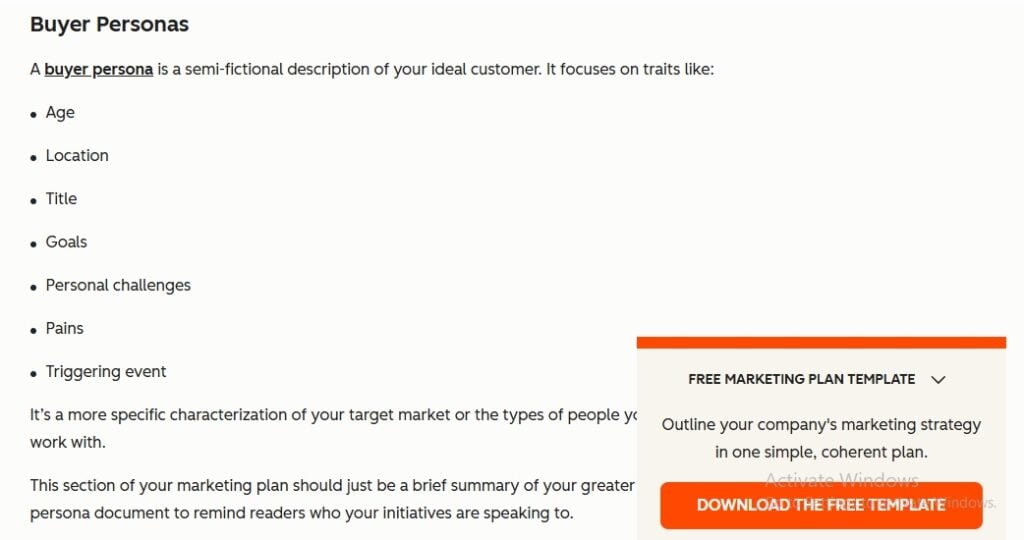
This keeps the reader on the page longer. If a user sees a giant wall of raw text, they bounce.
And in 2026, dwell time (how long they stay) is a massive signal to Google that your content is the real deal.
Pro Tip: Raw transcripts almost always feel a bit robotic. To keep that human-centric feel without the verbal clutter, we recommend using an AI Paraphraser and an AI Humanizer.
It’s the fastest way to rewrite transcript segments into natural, readable SEO text that doesn’t sound like an AI.
You get to keep your unique voice while making sure the flow is search-engine friendly.
Leverage Transcripts for Internal Linking Opportunities
Every time you mention a sub-topic in your video that you’ve already written a blog about, that’s an immediate internal linking opportunity.
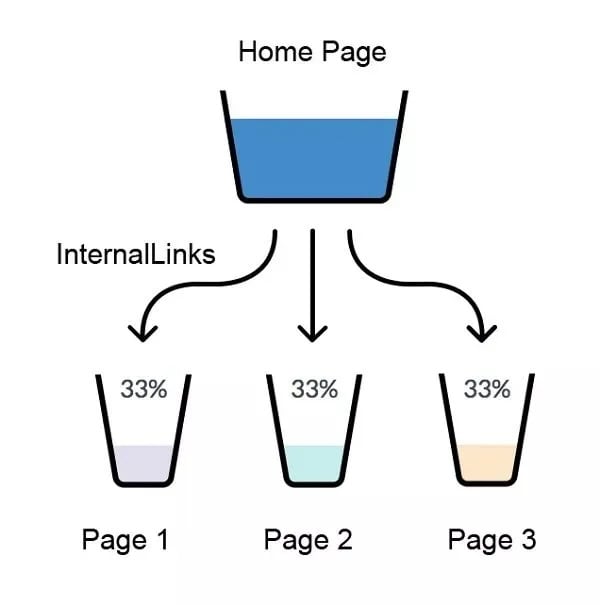
Example:
If you’re talking about “Digital Marketing” and you happen to mention “Email Segmentation” for ten seconds, you can hyperlink those specific words in your transcript to your deep-dive guide on email.
And one more thing…
You should never use words like “Click here” or “Read more.”
Instead, you should use descriptive keywords that you naturally spoke in the video.
| Instead of This | Use This (Naturally Spoken) |
| Check out our guide here | …when you’re performing a full SEO Audit on your site… |
| Click for our pricing | …depending on your Monthly Content Budget, you might see… |
| Read our latest post | …which is why Topic Authority is the main ranking factor now… |
Optimize Multimedia With Text-Based SEO
- Create Alt Text
Alt text helps search engines understand what’s happening inside your visuals.
Most people just write something generic like data chart. That’s a wasted opportunity.
Instead, look at your transcript. What were you saying while that image was on screen?
- If you said, “As you can see, we’ve hit a 20% increase in organic traffic via video SEO this year,” that is your Alt Text.
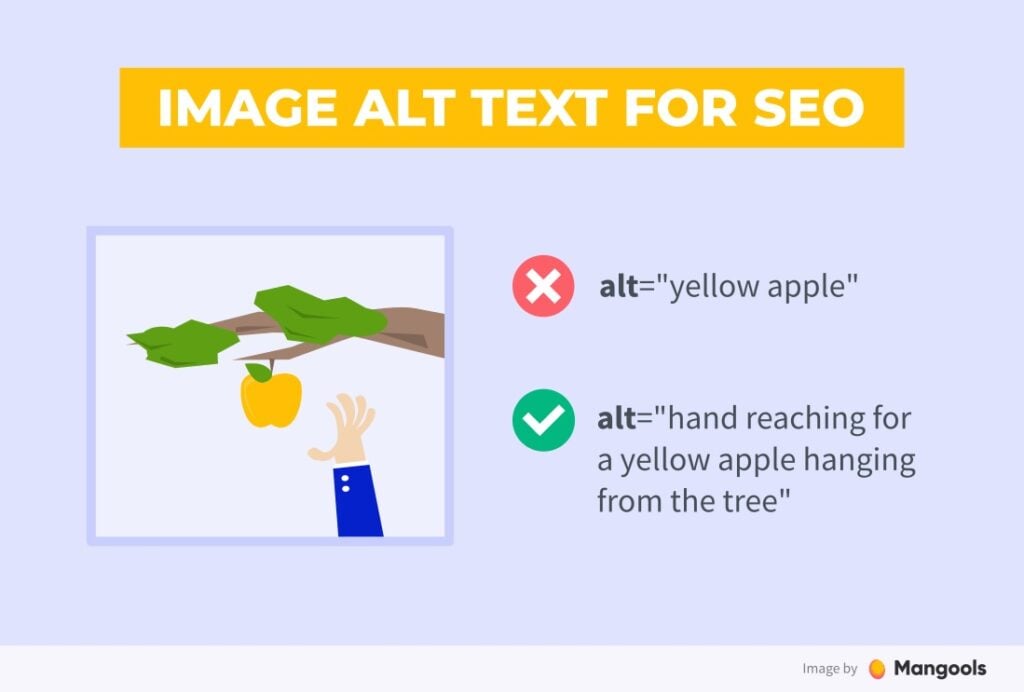
It’s descriptive, keyword-rich, and tells the search engine why that image matters to the user.
Since high-quality text is still the foundation of how Google indexes images, you can use this SEO Content Writer for your text-based assets.
This ensures these descriptions are as sharp as your video quality.
- Add Meta Descriptions
Your transcript already contains the perfect summary of your video. Use it.
Look for the part where you explain the “Why.”
- Script: In this video, we reveal 3 hidden AI tricks to boost SEO. Learn why transcripts are the secret weapon for 2026.
It’s punchy, natural, and much more engaging than a bot-generated summary.
When people see a meta description that sounds like a person speaking, your click-through rate (CTR) tends to skyrocket.
- Make Content Searchable
In a world of short attention spans, nobody wants to watch a 20-minute video to find one specific 30-second answer.
Add a “Search this Transcript” bar directly on your page.
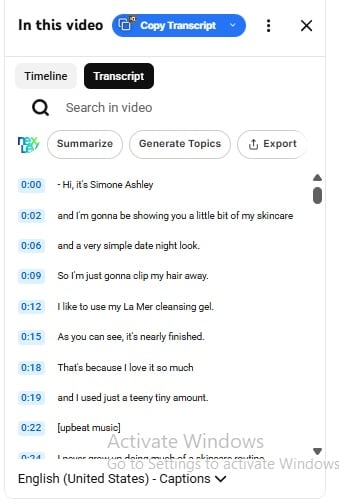
This way, a user can type a keyword and jump to the exact timestamp in the video where you talk about that topic.
This also tells Google that your page is a highly functional resource, which keeps your rankings high.
Measure Organic Growth From Transcript Content
Here’s how to measure whether your video SEO strategy is working in 2026:
| Strategy | Benefit | Pro Move / Strategy |
| Zero-Click Dominance | Position your brand as the primary source for AI-generated summaries (Gemini/SGE). | Frame spoken answers as direct “is/are” definitions to trigger AI citations. |
| Key Moments & Snippets | Automatically slices your video into searchable chapters on the Google results page. | Use clear transitions like “The first step is…” to help AI mark timestamps. |
| Voice Search Alignment | Matches the natural way humans talk to their smart glasses and phones in 2026. | Target long-tail questions like “How do I rank faster?” rather than stiff keywords. |
| Accessibility & Retention | Lowers bounce rates by serving the hearing-impaired and sound-off mobile users. | Place a quick text summary at the top to keep impatient readers on the page. |
| AI Reverse-Engineering | Uncovers conversational long-tails that you spoke but forgot to include in your text. | Use Gemini to find the top 5 questions you answered that aren’t in your title. |
| Semantic Gap Analysis | Captures niche traffic by using synonyms and metaphors that competitors missed. | If they say “budgeting,” you use “money-saving hacks” in your headers. |
| NLP Intent Mapping | Aligns your content with Google’s ability to understand “Entities” and “Human Intent.” | Use phrases like “The reason for [X] is…” to trigger direct answer boxes. |
Experiment with our AI Detector and Humanizer in the widget below!
Final Thoughts
In 2026, organic traffic from video content isn’t a bonus strategy. It’s the strategy.
Google’s AI wants real, spoken, human language. This is exactly what your transcripts contain.
Your video SEO strategy 2026 starts with what you already have: your voice, explanations, and natural way of answering questions on camera.
That raw spoken content, when properly extracted and structured, becomes the long-tail keywords from transcripts that search engines are actively rewarding.
So don’t record another video and let the transcript rot in a closed caption file.
Extract it. Structure it. Optimize it.
That’s how video transcript SEO compounds over time. And that’s how creators in 2026 are building organic traffic that works while they sleep.
Transform your transcripts into optimized, human sounding content with Undetectable AI.