
These days, there’s a tool for everything.
Do you need research done fast? AI can handle it. Do you need presentations, spreadsheets, or even a full webpage? AI can handle that too.
But only a few tools give you research, analysis, content creation, and multimedia generation all in one place, and Google Skywork AI is one of them.
Skywork AI is a complete AI workspace platform that helps you perform deep research, create documents, build slides, generate data visuals, produce podcasts, and even design websites, all inside a single system.
And in this blog, we’re going to review it in detail.
We’ll examine whether Skywork AI company is genuinely accurate or just another AI hype.
We’ll break down its features, pros, cons, accuracy performance, alternatives, and everything else that matters.
Let’s dive in.
Key Takeaways
- Scans 600+ webpages per task, delivering 10x deeper insights than competitors.
- Creates documents, slides, sheets, podcasts, and webpages from a single prompt.
- Scored 82.42% on the GAIA benchmark. Seriously impressive.
- Consistently rated 4.5–4.8/5 stars across platforms.
- Research takes 8–40 hours, but here it gets done in 8–20 minutes.
- Skywork AI charge structure is transparent but its credits can burn fast.
What Is Skywork AI?
Skywork AI PTE. LTD. is a Singapore-based AI workspace platform that helps you perform deep research, carry out complex analysis, and create professional-quality content.
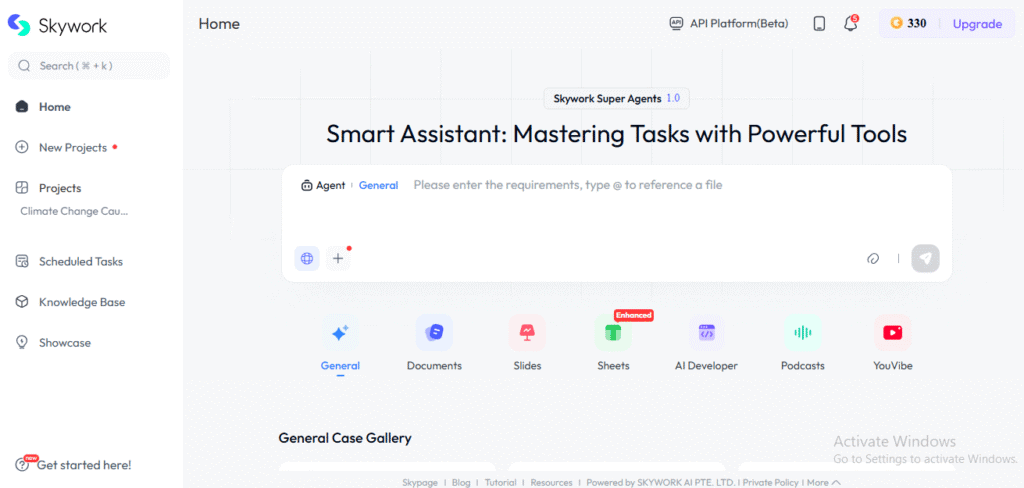
This tool is relatively new compared to the big players as it was officially launched in May 2025. What makes it special is its promise to:
- Scan 600+ webpages per task,
- Turn that data into research-backed documents, presentations, spreadsheets, podcasts, and even fully built webpages.
According to Skywork AI, it scored 82.42% on the GAIA benchmark. In simple terms: this score means that the tool is very strong at understanding, organizing, and synthesizing complex information.


Never Worry About AI Detecting Your Texts Again. Undetectable AI Can Help You:
- Make your AI assisted writing appear human-like.
- Bypass all major AI detection tools with just one click.
- Use AI safely and confidently in school and work.
When we researched user feedback, we found that people are loving the platform.
Its ratings are around 4.5–4.8/5, and two things come up again and again:
- The depth and quality of research it provides.
- The time it saves.
On the flip side, a few users do mention that credits can burn fast, and mobile performance isn’t always smooth.
Skywork AI didn’t start as a serious productivity tool.
A few years ago, it was Star Shine Entertainment PTE. LTD., building Android entertainment apps like DramaWave and StarMaker Lite, which together racked up over 5 million installs.
But between 2021 and 2024, the company pivoted completely. Entertainment was phased out, and AI became the new core.
The transformation paid off: today, it’s Skywork AI, a full-fledged AI workspace platform.
Skywork AI’s Key Features and Overview
What separates Google Skywork AI from competitors?
Let’s break down its core capabilities.
- Skywork AI uses a DeepResearch engine that can scan up to 600 webpages per task, giving 10x deeper research than most AI tools.
- It has five main agents:
- The Documents Agent creates reports, papers, resumes, contracts, and marketing content. It adds charts automatically, includes clear citations, and lets you export to PDF or DOCX or edit online.
- The Slides Agent makes presentations with auto-layout, ready templates, on-brand designs, and automatic charts. You can export to PPTX, PDF, HTML, or Google Slides, and regenerate single slides.
- The Sheets Agent analyzes data, finds trends, builds tables and charts with one click, and exports to XLS.
- The Podcasts Agent turns documents into scripts and audio using different voice styles. It supports English for now and can auto-generate daily podcast updates.
- The Webpages Agent creates simple no-code websites and supports HTML export.
- A General Agent handles extra tasks like making images, music, videos, audiobooks, illustrated books, and promotional videos. It can also run web searches and pull stock data.
- The credit system gives free users 2,500 starting credits plus 1,000 daily credits, with clear tracking.
- Skywork runs on Skywork R1V multimodal models along with OpenAI, Google, and open-source models. It’s trained on 3.2TB of multilingual and code data and uses cross-source verification for accuracy.
- It supports multiple languages including English, Spanish, Chinese, Japanese, and Korean.
- Security includes full encryption, a zero-trust setup, no data sharing, and full user ownership. Enterprise users get options like SSO and dedicated instances.
- Team features include real-time editing, permissions, version history, shared workspaces, and role-based workflows.
- It works on web, iOS, Android, Mac (M1+), and Apple Vision, with enterprise deployment available.
- Skywork AI also publicizes parts of its system on GitHub and Hugging Face and offers related tools like Mureka (music) and SkyReels (short videos).
Why Skywork AI Matters
Skywork AI addresses a major productivity challenge. A McKinsey report shows that professionals spend nearly 60% of their time on administrative and repetitive tasks.
Skywork AI company leadership understood this gap. They built a platform specifically to solve three key problems:
- Tool fragmentation: Users don’t have to switch between multiple apps for research, design, presentations, data analysis, and content creation. All tools are in one place.
- Quality and reliability: Skywork delivers consultancy-level content with verified sources.
- Time efficiency: Tasks that normally take 8–40 hours can be completed in 8–20 minutes.
It also features Clarification Cards, which ask precise questions upfront to ensure outputs match your exact requirements.
If you are a professional, researcher, student, or content creator whose work involves research, analysis, presentations, or content generation, Skywork AI matters for you.
Testing Skywork AI for Accuracy
We are testing Google Skywork AI’s general agent. Our goal is to evaluate how well it generates content such as images, videos, or search results.
We gave it the following prompt.

In response, it provided us with three outputs:
- A complete explainer document
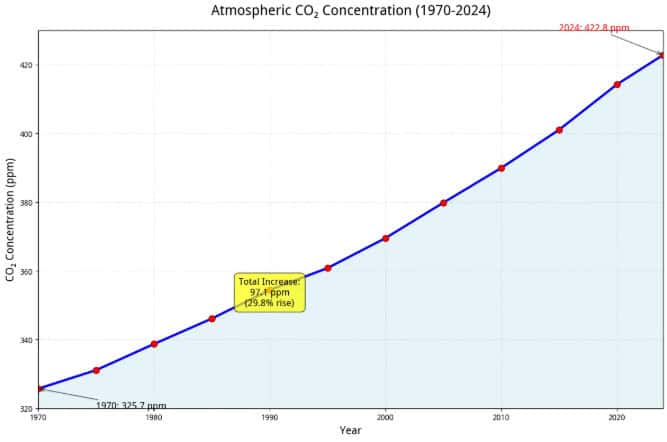
- A CO₂ chart
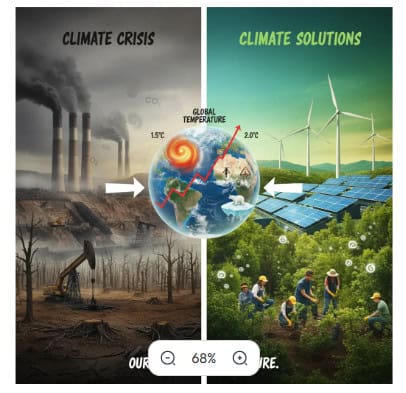
- Video storyboard with a supporting image
This is our detailed analysis of Skywork AI company’s “general agent.”
| Aspect | Strengths | Weaknesses |
| 1. Factual Accuracy & Data | Excellent alignment with scientific data. CO₂ levels (~325 ppm in 1970 and ~422.8 ppm in 2024) match NOAA’s real measurements. “Warmest decade” and fossil fuel percentages are also accurate. | The “Industrial Processes” section could include more precise examples, such as cement manufacturing’s specific CO₂ contribution. |
| 2. Data Visualization (Chart) | Strong execution: the system used Python in Jupyter to mathematically plot the chart. This avoids hallucination and ensures accuracy. The “Total Increase” box was a smart touch. | The chart uses plain Matplotlib default styling, which looks academic. A more modern or branded design would improve visual appeal. |
| 3. Image Generation | Text clarity was surprisingly good. Terms like “CLIMATE SOLUTIONS” and “GLOBAL TEMPERATURE” were readable. The crisis-versus-solution visual metaphor was clear and effective. | The image looked visually busy. Font sizing and layout could be refined to appear more professional and infographic-like. |
| 4. Storyboard Quality | Well-structured and practical. Each scene includes visuals, narration, and graphics. Adding technical notes (pace, music) shows a professional production mindset. | Some scenes felt generic (e.g., “Earth from space”). A stronger emotional hook or more original storytelling could increase impact. |
| 5. Citations & References | Good credibility. Links to UN, NOAA, and C2ES help with verification and reduce hallucination risk. | AI-generated references sometimes lead to outdated or broken links. Users should still validate each link manually. |
| 6. Relevance & Flow | Extremely relevant. The content matches the user’s request perfectly, and the structure (Intro → Causes → Data → Solutions) is clear and logical. | Because the context is global, regional tailoring is missing. A country-specific angle could increase relevance when needed. |
- Strong multi-modal capability: One prompt → full explainer, chart, storyboard, and supporting image.
- High factual accuracy: Scientific data (CO₂ ppm, warming trends, fossil fuel percentages) largely matches trusted sources.
- Professional structure: Content flow, citations, and technical notes give it a polished, research-backed feel.
- Visuals need refinement: Charts and images are accurate but lack modern design quality and branding polish.
- Storytelling depth limited: Scenes are solid but not emotionally compelling or uniquely creative.
- Citation reliability acceptable: Domains are credible, but URLs should still be manually verified.
Overall Verdict
Skywork AI company performs well for factual, research-driven educational content.
It’s reliable for accuracy and structure, but visual design and creative storytelling may require manual enhancement for professional-grade output.
Pros and Cons of Skywork AI
PROS
- Very high factual accuracy (scientific, climate, data-heavy topics)
- Deep Research Engine (scans up to 600 webpages)
- Multi-modal powerhouse → Docs, Slides, Sheets, Podcasts, Webpages, Images, Charts
- Professional structure (citations, logical flow, technical notes)
- Fast output → 20–40 hour research done in ~8–20 minutes
- Good team features (permissions, version history, collaboration)
- Security-focused → encryption + zero-trust system
- Works across platforms (Web, iOS, Android, Mac, VisionOS)
- Strong user ratings (4.5–4.8/5 in most reviews)
CONS
- Charts & images look “default” → not premium or branded
- Storytelling is factual but not emotional
- Credit consumption can spike quickly
- Mobile performance not always smooth
- Some citations may be outdated/unverified
- Generic scenes / templates in creative tasks
- Not ideal for hyper-creative filmmaking (more analytical than artistic)
Pricing Breakdown
Skywork AI pricing is structured in three tiers, and understanding them is crucial for your decision.
| Plan | Price | What You Get | Limitations |
| Free | $0 | 2,500 starter credits + 1,000 daily; All agents; General Agent; Charts; Docs; Slides; Sheets; Podcasts; Webpages | Credits limited; project storage limited; slower processing |
| Premium | $19.99/month | Priority speed; high credit limits; advanced features; collaboration tools; large storage | Claims cost advantage over OpenAI is unverified |
| Enterprise | Custom | SSO, admin controls, private instances, huge storage, dedicated support | Requires sales contact |
Skywork AI Alternatives
Wondering how Skywork AI company compares to other tools?
Here’s the honest breakdown.
| Tool | Strengths | Comparison to Skywork |
| Perplexity AI Pro | Deep web research, verified citations, strong accuracy | Better research accuracy than Skywork but lacks full multi-modal agents |
| Notion AI Workspace | Docs + task mgmt + team workflows + AI summaries | Better for team productivity; Skywork better for research depth |
| Google Gemini Advanced (Workspace Integration) | Strong multi-modal, integrates with Sheets, Slides, Docs | More polished visuals. Skywork offers deeper research scanning |
Can Skywork AI Detect AI-Edited or Paraphrased Text?
The short answer is “No.” Skywork AI can perform many powerful tasks (research, analysis, slides, data visualization, multi-modal outputs) but AI detection is not its purpose.
This means it:
- Cannot detect paraphrased text
- Cannot detect humanized or rewritten text
- Cannot identify whether content was originally AI-generated
If your goal is to make sure your content bypasses AI detectors, Google Skywork AI is not built for that function.
For this purpose, you should use alternative tools such as AI Paraphraser, and AI Stealth Writer.
These tools help you:
- Transform AI-written text into genuinely human-like writing
- Remove AI patterns or “fingerprints”
- Bypass mainstream AI detectors
- Produce unpredictable, non-AI style expressions
Their main advantage is that they rewrite AI-generated content into natural, human-sounding text, making it far more likely to pass detection.
Test our AI Detector and Humanizer with the widget below!
Final Verdict
Skywork AI PTE. LTD. has built a genuinely useful tool. Like all tools, it’s not perfect, but it solves problems that waste professionals’ time every single day.
Professionals spend nearly 60% of their time on administrative tasks. Skywork AI can cut that dramatically.
The Skywork AI pricing, whether you choose free, $19.99/month, or enterprise is reasonable given what you receive.
Yes, Skywork AI charge can accumulate if you run many projects, but you’re not paying per task like some competitors.
Here’s what we recommend: Start with the free tier. Generate a document. Make a presentation. Create a data analysis.
See if it clicks with your workflow. Most users who try Skywork AI end up staying because it actually delivers.
The Skywork AI company has invested in capability, accuracy, and time-saving. In 2025, why waste time on tasks machines can handle better?
For maximum efficiency and content authenticity, pair your Skywork AI workflow with Undetectable AI — ensuring all your outputs remain human-like, high-quality, and fully undetectable by AI detectors.