
The popularity of video conferences following COVID-19 has been sustainably increasing. It is estimated that the U.S. video conferencing market is expected to increase by at least 8% every year until 2030.
And it makes perfect sense. Why would any business not want to save up on travel expenses and reduce overhead when they can get the same job done through an online meeting as opposed to in-person?
The only problem with video conferences is that being unprepared for the meeting will waste your time and that of the attendees.
You need to prepare for the meeting content in itself and in terms of the hardware, the internet connection, audio devices, video camera, etc.
In this article, I’ll spill the exact tips that will save you precious time during your video conferences and make your meeting experience engaging, too.
These video conference tips cover everything from your setup to keeping your team actively involved.
Key Takeaways
- Always be prepared for video conferences from both the technical aspect and the human aspect.
- Check your internet, speakers, microphone, and webcam if they are working fine. Also, prepare your meeting agenda beforehand.
- Make your video background clutter-free or blur it. Mute yourself when not speaking so that nobody gets interrupted during the meeting.
- Make your video conferences engaging by dividing the team into smaller breakout rooms or introducing a whiteboard for actively brainstorming ideas.
What is a Video Conference?
Any form of communication between two or more people sitting far apart via audio and video is known as Video conference.
It is obviously much better than an audio-only phone call because you sit with your camera open and communicate very similar to the way you’d do in in-person meetings.
Video calls have been a norm for people whose family and friends live abroad. The same concept got widely popular among businesses, particularly in the aftermath of the COVID-19 pandemic, where people were forced to work remotely.


Never Worry About AI Detecting Your Texts Again. Undetectable AI Can Help You:
- Make your AI assisted writing appear human-like.
- Bypass all major AI detection tools with just one click.
- Use AI safely and confidently in school and work.
And as more and more companies reduce their in-person working hours and shift towards flexible working environments, video conferencing will only get more prevalent.

Preparing Before The Video Meeting
If you are new to video conferencing, chances are, the first fifteen minutes of your meetings are spent figuring out each other’s audibility and video screens.
The key to improve your video conferences is to make sure you are prepared, from the technical aspect as well as the human aspect. Here’s what I mean.
- Check camera and audio early
We usually don’t have a problem connecting video calls with friends or family because there’s no pressure.
If your microphone is acting up, you’ll just switch to your headphones and restart the call. In professional settings, however, it’s not the most appropriate etiquette.
This is especially important if you’re looking for video conference interview tips, since first impressions during a job interview happen within seconds of joining the call.
You must, therefore, click on the video conference link and join the meeting waiting room, where you can test out your video and audio tools.
Open the camera and see if your view is clear. Clean the camera if need be.
Similarly, test your device audio, both the speaker and the built-in microphone components, to confirm that they’re running well.
- Test your internet connection
It goes without saying, but online video conferences can not happen without an active, stable internet connection.
Make sure your connection is set up well enough to sustain your video during the meeting. Ideally, keep a back-up internet service device close to yourself in case your primary network glitches.
Turn off the smart devices at your home that take a huge chunk of your internet bandwidth, i.e., playstations, robot cleaners, 4K smart TVs, your HomePod, etc.
Excessive bandwidth usage by these devices could disrupt your meeting.
If, for whatever reason, your internet connection is unstable and you can’t do anything to fix it beforehand, inform your team that you will only be connected via audio during the meeting. Turning the video off will improve the delivery of your voice through a weak connection.
- Prepare agenda and materials
Now that our technical aspect is sorted, you need to make sure you yourself are ready for the meeting. Get dressed in formal, professional attire and select a quiet zone at your home to attend the meeting.
If you’re searching for tips for video conference interview success, this step alone can set you apart from other candidates.
And prepare whatever you’ll be talking about in the meeting beforehand.
Create an agenda, i.e, a document that outlines what the meeting will be about, so that anyone who misses the document can look at it and catch up with the meeting.
A defined agenda with a title and session descriptions will allow all attendees to know what to expect from the meeting.
For the agenda, you could use the Undetectable AI’s Title Generator tool to create meeting titles and session topics.
Running A Clear Virtual Meeting
While you are in the meeting, there are certain measures you should take to ensure the meeting runs without any inconveniences.
- Keep yourself muted whenever you’re not speaking. Ideally, the only person speaking at a moment should be un-muted so that any disturbance from the background of other attendees does not disturb the flow of the conversation.
- Ensure that your room is well lit and your video is clearly visible to the attendees. If your background is too cluttered, you can blur it easily if you’re using platforms like Google Meet, Microsoft Teams or Zoom. These are also solid tips for looking good on video conference calls, where your appearance and setting reflect your professionalism.
- Microsoft Teams allows you to turn on subtitles (live captions). Simply go to “More actions” in your meeting controls, scroll through the “Select Language and speech” section, and turn the toggle for “Show live captions” on. It will help you clearly understand what is being spoken about in the meeting.
- Record your meeting and write down all the major points of discussion in one place. After the meeting, use Undetectable AI Humanizer to rewrite your meeting script in a clear, natural tone.
Video Conference Tips That Save Hours Every Week
Besides the technical tips we’ve talked about so far that improve the running experience of your meeting, you could also implement some functional rules to save yourself time during online meetings.
You could assign your team members specific tasks during the conference (and ideally, also have one person on backup for the same job).
For example, ask one of your team members to record the meeting for transcription, and ask someone else to take notes.
Dedicate one team member to read out the rules to be followed at the beginning of the conference. You can also use AI productivity tools like Otter.ai to automate these tasks as well.
Try to implement a “raised hand” policy for anyone wanting to contribute to the conversation. Otherwise, multiple people may end up speaking at the same time and it will only disrupt your discussion.
These protocols will save you a lot of precious time.
Keeping Teams Engaged During Calls
Video conferencing can get too monotonous, sometimes even boring, for attendees. If you want to keep your team engaged, you’ll have to involve active participation in the meeting rather than just sitting there and listening to what everyone has to say.
You could open a virtual whiteboard during the meeting on which multiple people can provide their input at the same time.
Almost all good video conferencing whiteboards give you an infinite canvas space, collect everyone’s input in one place, and visualize it together.
If your team is large and you need to discuss multiple aspects of a project, you could divide the conference into breakout rooms, i.e., smaller subsets of the meeting, each of which holds a different conversation.
The host can divide the team into smaller groups for a limited amount of time and then connect everyone back to the main conference to share their findings.
Certain virtual meeting platforms may even allow you to personalize the meeting room name, URL, and add branded imagery that keeps your team engaged.
Allow the use of AI tools to consolidate the meeting points in one place. Using Undetectable AI’s AI SEO Writer, for instance, can be a really interactive approach to creating summaries and internal content for your meeting.
And if your team regularly conducts hiring calls, these interview video conference tips apply just as well to candidate screening sessions.
Smarter Meetings With Undetectable AI Tools
Time and effort are the two business commodities you must save on. Undetectable AI offers multiple smart tools helpful during video conferences that save you both.
- Generate clearer meeting materials
Every video conference will have an agenda. Undetectable AI writing suite will be of great help to you for creating your agenda.
Use the AI Content Writer to prepare a draft for the agenda such that everyone attending the meeting is very clear about what is being discussed.
- Answer team questions quickly
Undetectable AI has a dedicated Question Solver that you can keep open alongside your video conference.
Any time you get thrown a question by a team member that you’re not sure about, simply ask the tool, and it will give you a relevant, context-specific answer.
You just have to upload the screenshots of the text to give the tool some context about your question. It will analyze the images and provide you with detailed explanations that answer your questions.
- Create professional summaries
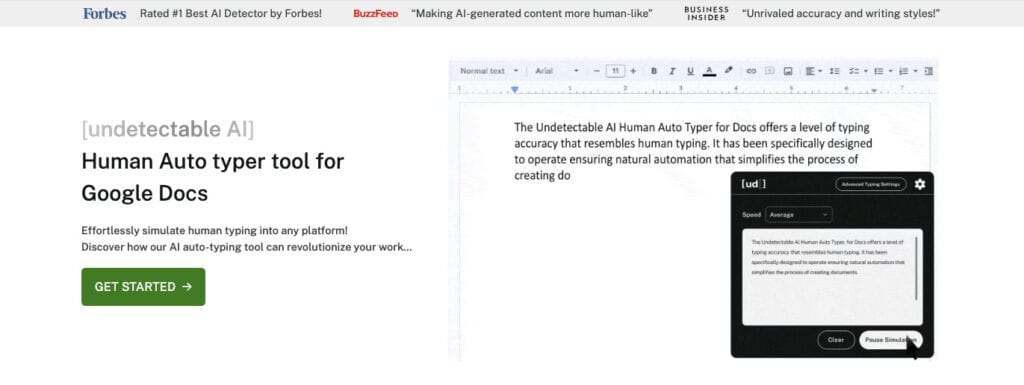
Perhaps the coolest Undetectable AI feature you’ll find is the Human Auto Typer tool that simulated human typing into any platform.
It will automatically type out all your pre-written or copy-pasted points that you’ll discuss in the meeting into a clear document.
It is great for generating a summary of your meeting after you’re done with the conversation.
For an added layer of protection against false plagiarism accusations, you could run your text through Undetectable AI’s AI Humanizer to introduce the natural quirks and nuances of human-written content.
Test our AI Detector and Humanizer with the widget below!
Final Thoughts
Video conferences are here to stay, and with increasing emphasis on flexible roles in the corporate sector, you have no choice but to get better at them.
Follow the video conference tips I’ve discussed above, and I’m pretty sure you’ll notice drastic improvements in your meeting experience.
Better yet, include Undetectable AI in your meeting infrastructure stack for writing quick business documents, agendas, meeting summaries, and any notes you’d like to take away from the meeting.
Give Undetectable AI a try today!