
Creating a presentation for work shouldn’t feel like a design marathon. Yet for most professionals, that’s exactly what happens.
You start with a clear idea of what you want to say… then you waste hours adjusting layouts, fixing spacing, and making sure slides don’t look like they were thrown together five minutes before a meeting.
If you’re sick of this endless cycle, Beautiful AI promises a way out. But is its content actually good enough for the real world?
Read on for our full take on Beautiful AI, including how it works, its strengths and weaknesses, and whether or not it’s a practical option for business presentations (especially for teams working with AI-generated content).
TL: DR – If you want to create clean, basic presentations fast, Beautiful AI is worth using. Just don’t expect it to replace a skilled copywriter or advanced AI writing tools.
Key Takeaways
- Beautiful AI uses smart slides to automatically manage layout and formatting, which saves users from tedious manual design adjustments.
- A built-in DesignerBot can create entire presentation drafts instantly using only a text prompt, an uploaded document, or a web link.
- The platform ensures brand consistency by automatically applying specific fonts, colors, and logos across every slide in a deck.
- Completed presentations can be exported as editable PowerPoint files, PDFs, or Google Slides to maintain a smooth professional workflow.
- Because the AI-generated text can sound generic and trigger detection, using Undetectable AI helps refine and humanize the content before sharing it with clients.
What Is Beautiful AI?
Beautiful AI is a cloud-based presentation tool that helps automate the slide creation process.
Unlike most presentation tools that give you a blank canvas to start with, Beautiful AI uses “Smart Slides”, which are pre-built layouts that automatically adjust spacing, alignment, and formatting as you add or remove content.
This is particularly helpful for things like:


Never Worry About AI Detecting Your Texts Again. Undetectable AI Can Help You:
- Make your AI assisted writing appear human-like.
- Bypass all major AI detection tools with just one click.
- Use AI safely and confidently in school and work.
- Pitch decks
- Marketing presentations
- Internal reports
- Training materials
While Beautiful AI doesn’t offer the same level of flexibility as more advanced design software, it does offer a faster way for average users to create clean, professional presentations (so they don’t get bogged down in manual design work).
Feature Highlights of Beautiful AI Presentations
Here’s a quick look at Beautiful AI’s key features:
- Smart slide layouts: As you add or remove content, each slide rearranges itself so everything stays balanced and readable.
- No blank slides to start from: Just pick a slide type that fits your goal, and go from there.
- Formatting runs in the background: Text, images, and charts resize automatically, so you don’t have to continuously nudge things into place.
- Built-in brand consistency: Fonts and colors stay consistent across the entire deck, so you don’t have to worry about checking for inconsistencies.
- Plenty of ready-made slide types: Choose from different types of templates designed for specific goals, like pitches, reports, or training decks.
- Clean, professional look by default: Slides immediately look polished, without relying on heavy styling.
How Beautiful AI Works
Using Beautiful.ai is fairly straightforward, even if you’ve never built a presentation outside of PowerPoint or Google Slides.
Here’s what the process looks like:
Step #1: Choose a Theme
To start, all you have to do is pick a theme. This sets the overall tone of the presentation.
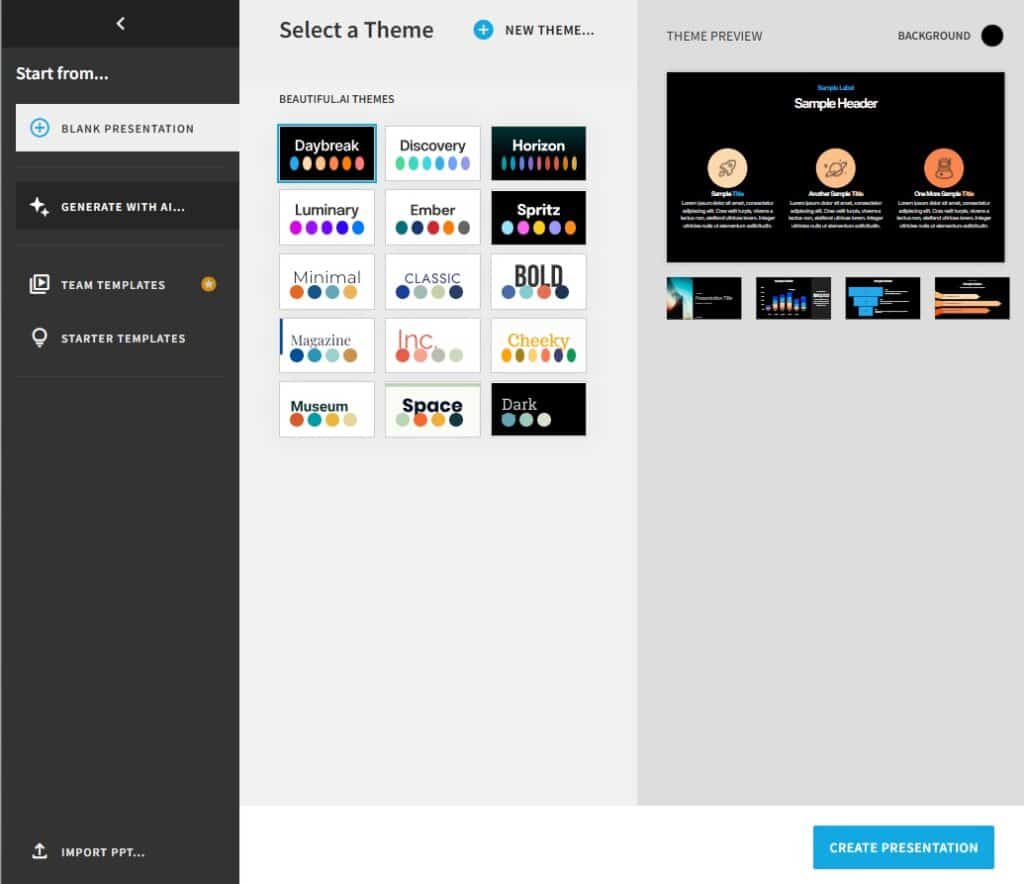
Here, you can choose from different colors, fonts, and layout rules, and then Beautiful AI applies it across every slide.
Once that’s done, you don’t have to think about styling again (unless you want to change the look later on).
Step #2: Build Your Slides
Now it’s time to add your content. You can either upload existing material or write a prompt, and Beautiful AI can generate the content for each slide for you.
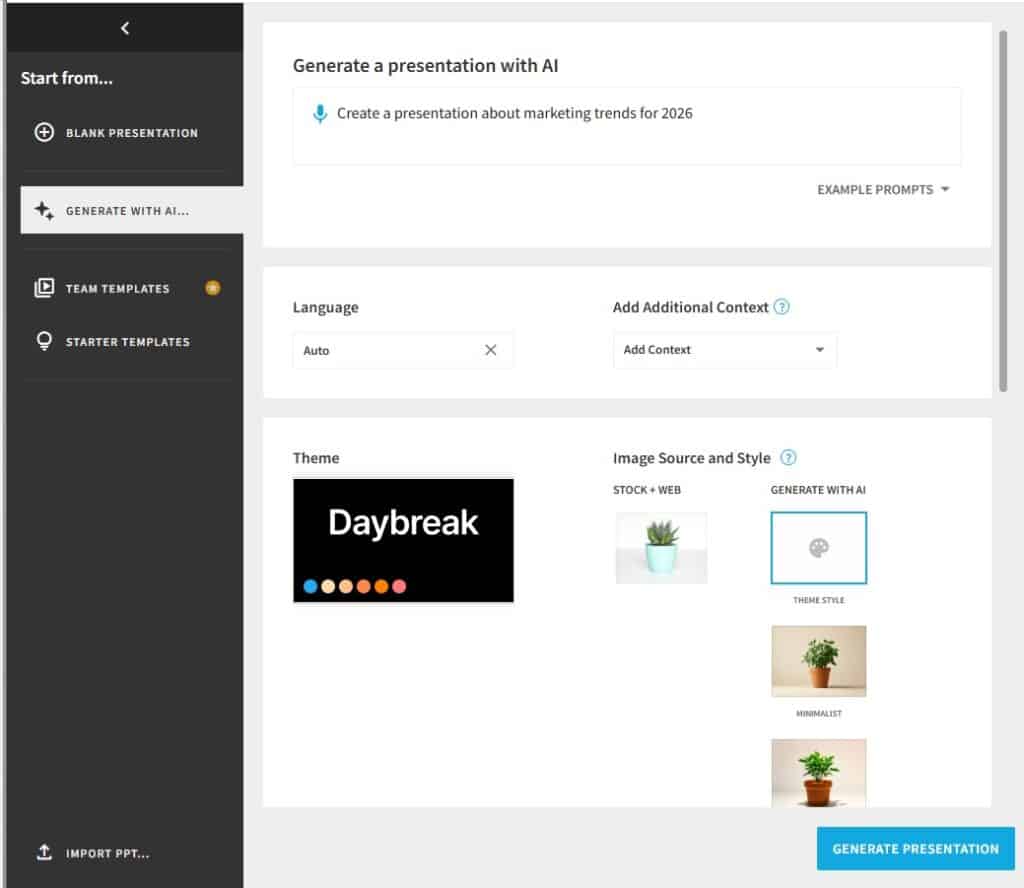
Step #3: Edit and Customize
Once your content is ready, you can edit the text, images, and data points. As you edit, each slide automatically rebalances itself, so you can stay focused on the content (not formatting).
Step #4: Export
When you’re all finished, you can download the presentation as an editable PowerPoint file, a PDF, Google Slides, or image-based slides.
You can also share a link to your presentation, so other people can view it online or collaborate without needing to download the file.
Beautiful AI Accuracy
Visually, Beautiful AI does what it’s supposed to do. Slides look clean, structured, and professional. And while the output won’t win any design awards, the design quality still does the job for most businesses.
What we really wanted to check in this review, though, was the other half of the equation: the AI-generated content itself, and how usable that text is beyond the visuals.
So we decided to test the tool for ourselves.
We started by creating our own presentation for the topic: Marketing Trends for 2026.
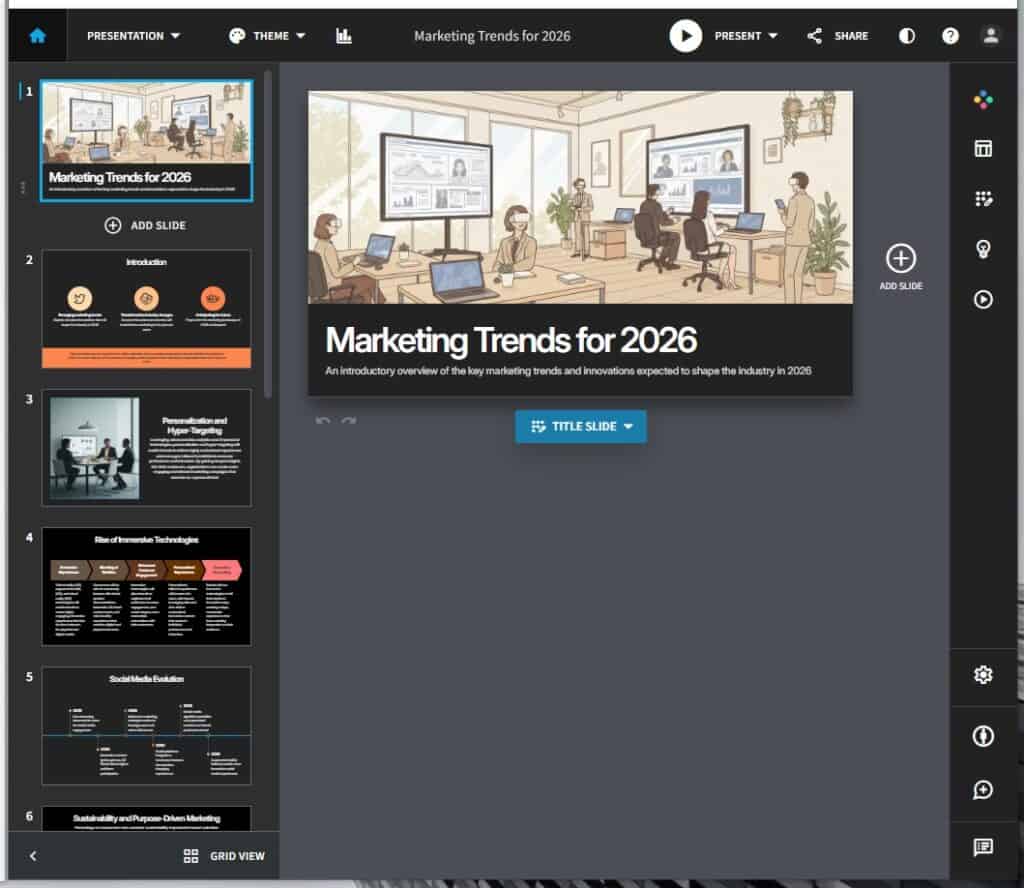
We then read through the content ourselves, before running a snippet through a few different AI detectors to see if it could pass as a high-quality, human piece of content.
For full transparency, here’s the snippet we chose to test:
| Beautiful AI: Generated Text for “Marketing Trends for 2026” [Sample Snippet] |
| Personalization and Hyper-Targeting Leveraging advanced data analytics and AI-powered technologies, personalization and hyper-targeting will enable brands to deliver highly customized experiences and messages tailored to individual consumer preferences and behaviors. By gaining deeper insights into their customers, organizations can create more engaging and relevant marketing campaigns that resonate on a personal level. Rise of Immersive Technologies Immersive Experiences Virtual reality (VR), augmented reality (AR), and mixed reality (MR) technologies will enable brands to create highly engaging, immersive experiences that blur the lines between the physical and digital worlds. Blending of Realities Consumers will be able to seamlessly interact with virtual product demonstrations, interactive 3D brand environments, and mixed reality experiences that combine digital and physical elements. Enhanced Customer Engagement Immersive technologies will allow brands to captivate their audiences, increase engagement, and create deeper, more memorable connections with their customers. Personalized Experiences Personalized, tailored experiences will become the norm, with brands leveraging data and AI to deliver customized, immersive content that caters to individual preferences and behaviors. Innovative Storytelling Brands will use immersive technologies to tell their stories in innovative ways, creating unique, memorable experiences that leave a lasting impression on their audience. |
Our first impression was that the content was clear and easy to follow. However, it also felt a bit generic, with familiar AI-style phrasing and no real insights or detailed examples.
Now on to the AI tests. We chose to run it through the following AI detectors:
- Undetectable AI, which is one of the most accurate AI detectors available.
- Grammarly, one of the most widely used tools.
- MyDetector, another popular detector.
Here are the results:
| Beautiful AI Output Detection Results | ||
| Undetectable AI | Grammarly AI | MyDetector |
| 90% AI | 15% AI | 45% AI, 18% Mixed, 38% Human |
The results show that the most sensitive detector (Undetectable AI) flagged the content as clearly AI-generated.
Grammarly was much less strict, while MyDetector landed somewhere in the middle, labeling a significant portion of the text as mixed or human.
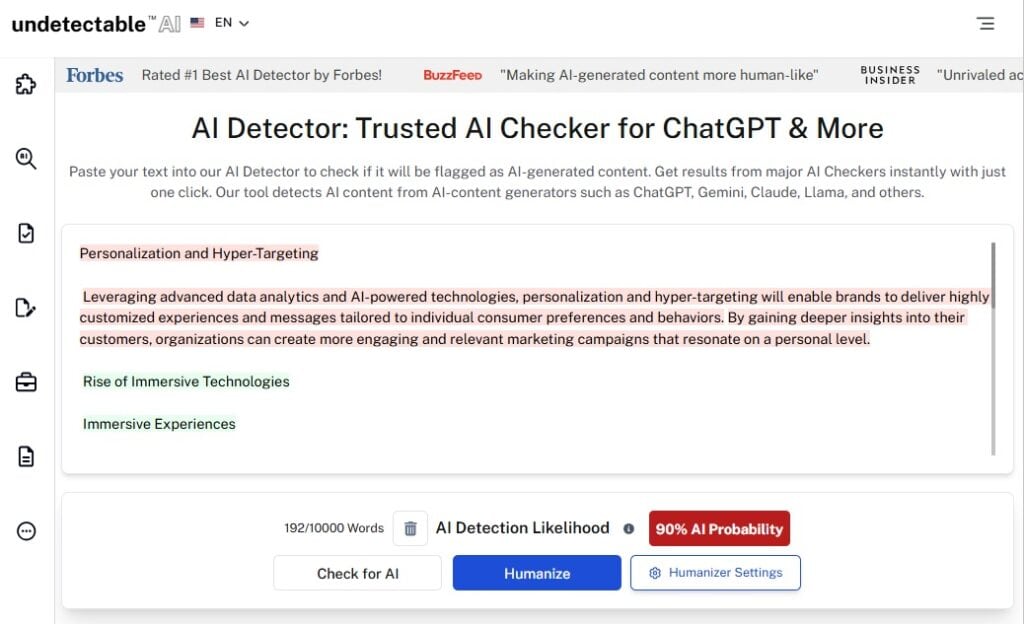
This inconsistency highlights two important things:
- Beautiful AI’s AI-generated text is readable and usable. But it can still flag some AI detectors.
- Whether it gets flagged or not depends heavily on which detection tool is used.
For internal presentations or early drafts, this likely won’t matter. But if you plan to reuse your presentation text publicly (like in marketing materials, blog posts, or client-facing decks), it’s something you need to be aware of.
Pro Tip: If you do plan to publish your presentation text, use Undetectable’s AI Detector to see how it performs against high-sensitivity detection models before publishing.
And if anything gets flagged, the built-in humanizer tool can help you quickly rewrite high-risk sections.
Beautiful AI Key Advantages and Limitations
Beautiful AI is very good at what it’s designed to do, but it’s not trying to be an all-in-one content creation and presentation design platform. Here’s a quick look at where it shines and where it falls short.
| Beautiful AI Strengths and Limitations | |
| Strengths | Limitations |
| Builds slides fast using smart layouts that handle spacing and formatting for you. Easy to use, even if you have zero design experience. Keeps branding consistent across the entire deck. Produces clean, professional slides with simple PowerPoint and PDF exports. | Limited creative freedom compared to more traditional design tools. Slides can feel templated (especially if you use them a lot). Not suitable for more complex animations or highly custom visuals. AI-generated text can sound generic, and will likely be flagged by detectors. |
Beautiful AI vs Competitors
To put Beautiful AI into context, it can be helpful to compare it to the other presentation design tools out there.
Here’s a quick side-by-side look at how Beautiful AI compares to popular tools like Canva, PowerPoint, and Tome.
| Tool | Best For | Where It Excels | Key Limitation | Price (Starting) |
| Beautiful AI | Fast, structured business presentations | Smart layouts, brand consistency, minimal formatting | Limited creative control; templates can feel repetitive and overused | ~$12/user/month |
| Canva | Marketing and creative presentations | Design flexibility, templates, content, and image AI | Requires more manual layout work for decks | ~$12.99/user/month |
| PowerPoint | Full control and enterprise use | Custom layouts, animations, offline access | Time-consuming formatting | ~$159 one-time fee or Microsoft 365 subscription |
| Google Slides | Simple collaboration | Real-time editing, free access | Weak design automation and visuals | Free |
| Pitch | Modern team presentations | Clean UI, collaboration-first design | Less mature layouts and automation | ~$8–$25/user/month |
| Tome | AI-driven storytelling | Strong narrative flow, AI-generated content | Not ideal for more structured business decks | ~$10–$20/user/month |
Can You Pair Beautiful AI With Our Tools?
Yes, and in our opinion, this is the only way to get the most out of Beautiful AI.
Here’s a simple workflow that plays to the strengths of both platforms:
- Create slides in Beautiful AI: Use it to build a clean, well-structured presentation quickly.
- Review slide text with Undetectable’s AI Detector: Check whether any generated text is likely to be flagged as AI before you share or publish it.
- Expand or enhance content with AI SEO Content Writer or Story Generator: This is especially useful if you plan to turn your slide content into blog posts, landing pages, or long-form assets.
- Final Edits in Beautiful AI: Once the text is refined, you can copy/paste it back into Beautiful AI to enhance your deck with more natural, polished copy.
Try out our AI Detector and Humanizer right below!
Frequently Asked Questions About Beautiful AI and AI-Generated People
Does Beautiful AI create hyper-realistic beautiful AI girl images?
No. Beautiful.ai does not generate images of people. It’s a presentation tool designed to generate presentation slides quickly.
Can Beautiful AI generate a beautiful AI woman for presentations?
No. Beautiful.ai does not create human characters, portraits, or avatars. Any people shown in presentations come from uploaded images or stock image integrations, not AI-generated humans.
Is Beautiful AI used to make an AI-generated beautiful woman?
No. Beautiful AI is limited to layout automation and design formatting. It does not generate faces, people, or realistic human visuals.
What kind of visuals does Beautiful AI generate?
Beautiful.ai generates:
– Slide layouts
– Charts and graphs
– Timelines and diagrams
– Structured text and visual blocks
– It does not generate photos, people, characters, or realistic images.
Our Final Verdict on Beautiful AI
Think of Beautiful AI as a presentation engine, not a full creative or writing solution.
Yes, it’s helpful for quickly turning your ideas into a slide deck, but it’s not built to replace thoughtful writing or deep creative control.
To get the most out of the platform, aim for that sweet spot of using Beautiful AI for your presentation design, and then pairing it with tools like Undetectable AI to review, refine, and humanize any AI-generated text before publishing.