
Grammarly is one of the most widely used writing tools in the world, with more than 30 million people relying on it every day for things like proofreading, editing, and, since 2025… AI detection.
But before you put too much weight on a Grammarly AI score, it’s worth remembering that AI detection isn’t Grammarly’s core product, and the detector has actually attracted quite a lot of criticism from students, teachers, and content creators since its launch.
At Undetectable AI, we analyze AI detector performance every day. So, to see if that criticism is warranted or overblown, we tested Grammarly’s built-in AI detector across five different content types:
- Raw GPT-5.5 output
- Raw Claude Opus 4.6 output
- Humanized AI content
- Native English human writing
- ESL (English as a Second Language) human writing
The results revealed an AI detector that, as of June 2026, is fairly good at spotting obvious AI, but much less reliable once that AI content has been edited or humanized.
Principais conclusões
- Grammarly correctly identified both raw GPT-5.5 and Claude-generated content as AI-written.
- Grammarly correctly recognized both native English and ESL human writing as human-written.
- Grammarly completely missed the humanized AI sample, assigning it a score of 0% AI.
- Grammarly’s own documentation states that no AI detector is 100% reliable and that its detector should not be used as the sole basis for determining whether text was AI-generated.
- A Grammarly score can be helpful, but it shouldn’t be treated as definitive proof. For important decisions, it’s best to cross-check with another AI detector and look at contextual evidence like writing history and earlier drafts to make your final call.
How Grammarly’s AI Detector Works
Like most AI detectors, Grammarly looks for patterns that are commonly associated with AI-generated writing, such as sentence structure, word choice, predictability, and overall writing consistency.
After scanning a piece of writing, Grammarly then returns a score between 0% and 100%, with 0% AI indicating the text is likely human-written and 100% AI indicating it’s likely AI-generated.
The higher the score, the more confident Grammarly is that AI was involved.
Nunca mais se preocupe com a detecção de seus textos pela IA. Undetectable AI Pode lhe ajudar:
- Faça sua escrita assistida por IA aparecer semelhante ao humano.
- Bypass todas as principais ferramentas de detecção de IA com apenas um clique.
- Uso IA com segurança e com confiança na escola e no trabalho.
One of Grammarly’s biggest strengths is that it’s already part of a tool millions of people use every day. There’s no need to open a separate AI detector; you can check a piece of content in the same place where you’re proofreading, editing, and refining your writing.
The free version lets you scan passages up to around 10,000 characters, while Grammarly Pro increases the limit to roughly 5,000 words and includes additional features like plagiarism detection and AI-powered writing assistance.
The tradeoff is that, unlike dedicated AI detection platforms, Grammarly wasn’t built specifically to detect AI-generated text. As a result, its AI detector functions more as a bonus feature rather than a purpose-built AI detection solution.
Grammarly’s Own Accuracy Claims
To Grammarly’s credit, the company is transparent about the limitations of AI detection.
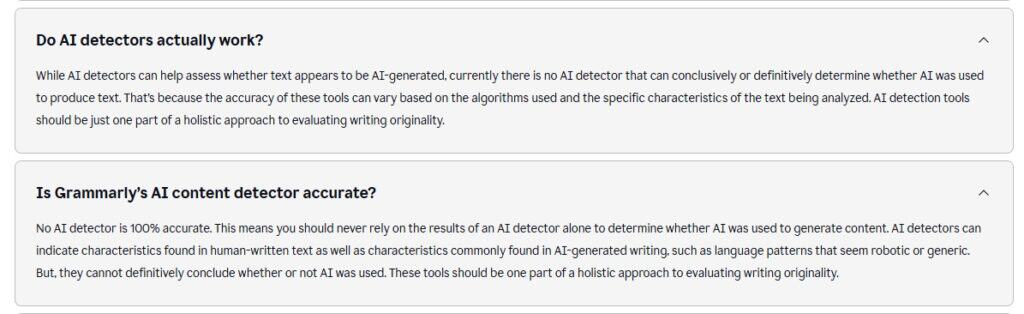
In its official documentation, Grammarly states that “no AI detector is 100% accurate” and that its AI detector “should be one part of a holistic approach to evaluating writing originality.”
That’s a really important disclaimer, because a lot of students and professionals treat AI scores as final verdicts rather than estimates, even though the companies building these detectors acknowledge that mistakes happen.
The 5-Category Test
The reality is that todos AI detector on the market can produce both false positives and false negatives. So when we run tests like this at Undetectable AI, we’re not looking for whether or not mistakes happen; we’re looking for:
- How often they happen
- When they tend to happen the most
To evaluate the accuracy of Grammarly’s AI detector, we created and gathered five different writing samples covering the scenarios people care about most: raw AI content, humanized AI content, native English writing, and ESL writing.
Each 400-word sample was then run through both Grammarly’s AI Detector and the Undetectable Detector de IA, so we could compare how the two tools responded to the same piece of content.
Here’s what we found.
| How Accurate Is Grammarly’s AI Detector? 5 AI Detection Results | |||
| Text Type | Grammarly AI Detector Score | Undetectable AI Detector Score | Veredicto |
| Raw GPT-5.5 Essay | 99% AI | 99% AI | Both flagged correctly with near-perfect confidence. |
| Raw Claude Opus 4.6 Essay | 75% IA | 94% IA | Both tools flagged the content as AI-written, although Undetectable AI was noticeably more confident in its assessment. |
| Humanized AI (Using Undetectable’s AI Humanizer) | 0% AI | 69% Human | The humanized text largely bypassed AI detection. Grammarly classified it as entirely human, while Undetectable AI also leaned toward a human-written verdict. |
| Native English Human | 0% AI | 1% AI | Both detectors correctly recognized authentic human writing. |
| ESL Human Writing (TOEFL sample) | 0% AI | 13% AI | Both detectors treated the sample as human-written, showing that non-native writing styles were not automatically mistaken for AI-generated content. |
Where Grammarly Struggles
Overall, Grammarly correctly classified four out of the five samples. However, a closer look at the results reveals three important limitations.
Humanized AI Content
The clearest weakness in our testing was humanized AI, with the raw GPT-5.5 output scoring 99% AI and the raw Claude output scoring 75% AI.
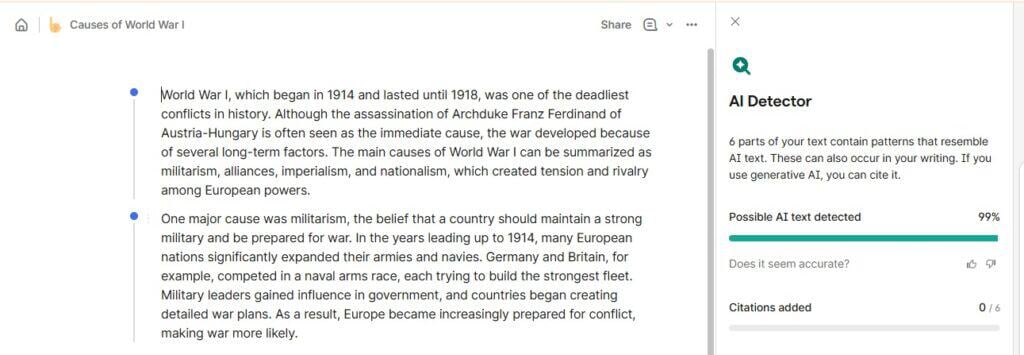
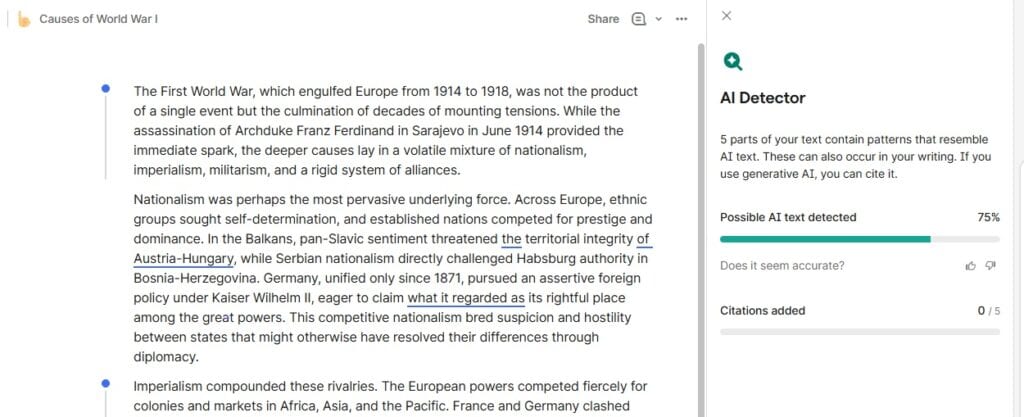
However, once the AI-generated text was humanized with Undetectable’s Humanizador de IA tool, Grammarly’s score dropped to 0%.
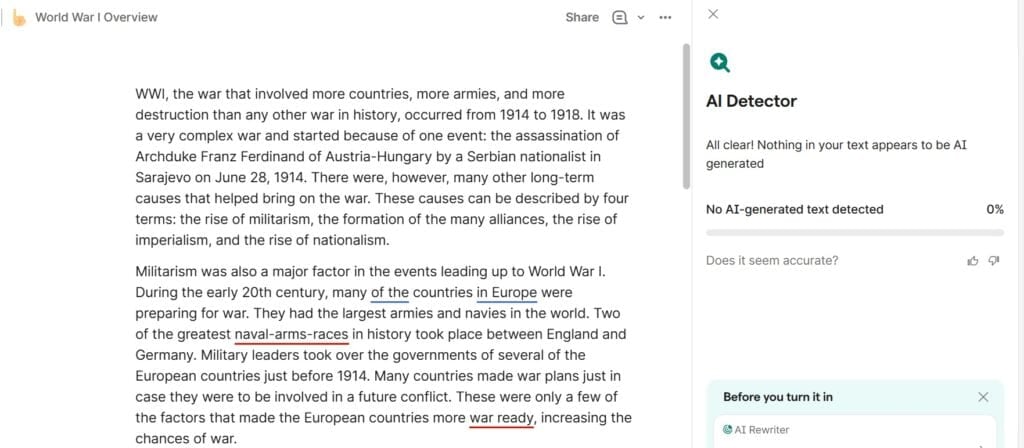
From Grammarly’s perspective, the AI-humanized content became indistinguishable from the 100% human writing sample.
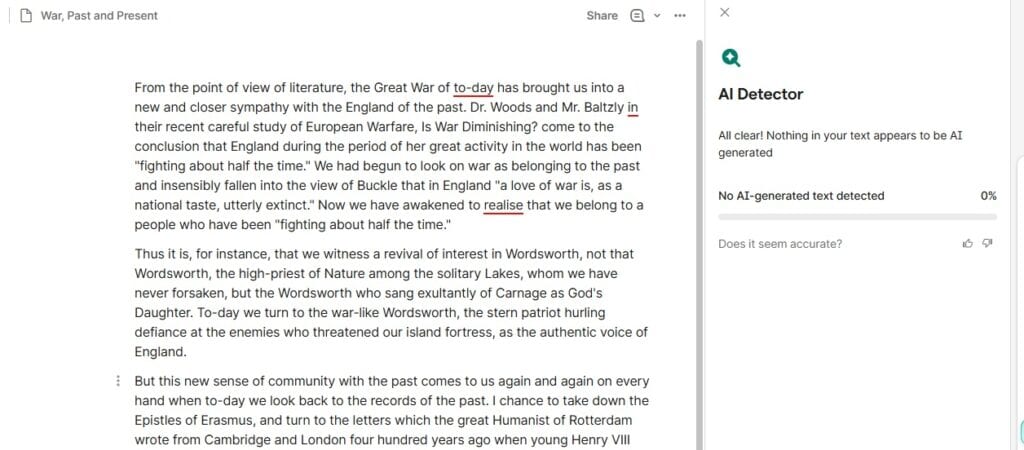
To be fair, this isn’t unique to Grammarly. Humanized AI is one of the biggest challenges facing every major AI detector tool today.
But it does highlight an important limitation: a detector’s performance on edited AI content is often more revealing than its performance on raw AI output.
ESL False Positives Are a Known Industry Concern
One of the most common criticisms of AI detectors is their treatment of non-native English writers.
De fato, um 2023 Stanford study found that several popular AI detectors incorrectly flagged large numbers of TOEFL essays written by ESL students as AI-generated, with false-positive rates exceeding 50% in some cases.
Interestingly, Grammarly did not show that behavior in our test.
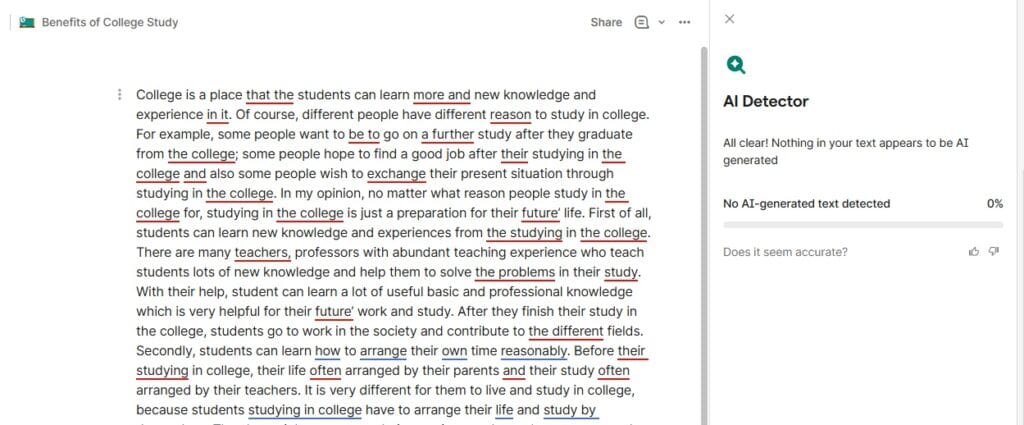
Our TOEFL writing sample received a score of 0% AI, correctly identifying the essay as human-written.
That’s a positive result for Grammarly, but it doesn’t eliminate the broader concern.
Research has consistently shown that AI detectors can struggle with certain writing styles, especially highly structured academic prose and writing from non-native English speakers.
And while Grammarly handled our ESL sample correctly, one successful result doesn’t guarantee the same outcome across every ESL writing sample.
In other words, this test suggests Grammarly may be less prone to ESL false positives than some detectors, but it’s not enough evidence to say the problem has been solved.
Short Passages Produce Less Reliable Results
It’s also worth noting that, like every AI detector, Grammarly is less reliable when analyzing short pieces of text.
Things like discussion posts, email responses, homework answers, social media captions, and short-form content often don’t provide enough information for a detector to make a highly confident assessment, which increases the likelihood of inaccurate results.
This is a structural limitation of AI detection itself. So as a rule of thumb, the shorter the sample, the more cautiously you should interpret the score.
Grammarly vs Dedicated AI Detectors

One of the biggest mistakes people make is assuming todos AI detectors are built for the same purpose.
They’re not.
Grammarly is a writing assistant first and an AI detector second. The detector is just one feature inside a larger platform designed to help people write better through grammar corrections, rewriting suggestions, plagiarism checks, and editing tools.
Dedicated AI detectors have a completely different mission. Tools like Undetectable AI Detector, GPTZero, Copyleaks, and Originality are built specifically to analyze text for AI-generated patterns, and they often include more detailed reporting, such as sentence-level highlighting, confidence scores, and model-specific analysis.
That doesn’t automatically make dedicated detectors “better” in every situation, but it does mean they’re often better equipped to handle the nuances and edge cases that make AI detection so difficult.
We saw this firsthand in this test. While Grammarly correctly identified the raw AI samples, it assigned the humanized AI text a score of 0% AI.
Undetectable AI, meanwhile, still recognized signals consistent with AI-assisted writing and classified the same sample as 69% human rather than fully human-written.
This is why, for important decisions, it’s often worth getting a second opinion rather than relying on a single detector score.
When to Use Grammarly
So, if Grammarly has so many limitations, is it still worth using?
In my experience testing and evaluating dozens of AI detection tools, Grammarly is generally a good fit if:
- You already use it as part of your daily workflow.
- You want a quick AI check without switching tools.
- You’re looking for a general probability estimate rather than a detailed investigation.
- Convenience matters more than advanced reporting.
- You want AI detection bundled with grammar, plagiarism, and editing features.
For a lot of people, that’s enough. And it’s a big reason why Grammarly’s built-in AI detector remains so popular.
When to Use a Dedicated Detector
That doesn’t mean dedicated AI detectors don’t have a place. In fact, the higher the stakes, the more valuable specialized detection tools become.
In my opinion, a dedicated AI detector is essential if:
- You’re making academic, workplace, or publishing decisions where accuracy matters more than convenience.
- You want to see exactly which sentences or passages triggered detection.
- You’re comparing results across multiple detection models.
- You’re reviewing content that may have been heavily edited, paraphrased, or humanized.
- You’re cross-checking a Grammarly result before making a final judgment.
Our own testing highlights why that extra layer of analysis can be so valuable.
Grammarly correctly identified both raw GPT-5.5 and Claude content as AI-generated. But once the text was humanized, Grammarly’s score dropped to 0% AI.
That’s why experienced reviewers and editorsnunca rely on a single AI detector.
The best practice is to compare results from multiple systems, and then combine those findings with other evidence, such as previous writing samples, document version records, and the broader context surrounding how the document was created for the fairest evaluation of a piece of written work.
Pricing: Grammarly vs the Free Alternatives
After comparing accuracy, the next question is usually: How much does all of this cost?
Fortunately, most AI detectors have free plans, which means you’re rarely forced into a subscription just to test a tool. The differences are usually found in the scan limits, reporting features, and overall workflow.
Here’s how the most popular AI detectors compare.
| Grammarly vs Popular AI Detection Tools: Pricing and Features Comparison | ||||
| Ferramenta | Plano gratuito | Plano pago | Limites de uso | Standout Features |
| Detector de IA da Grammarly | Sim | Grammarly Pro starts at $12/month | Plano gratuito: 10,000 characters per check Plano Pro: 5,000 words per check | Built into Grammarly’s writing suite with grammar checking, plagiarism detection, and rewriting tools |
| Detector de IA indetectável | Sim | Premium plans available | 10,000 words per check for both free and paid plans | AI detection, humanization tools, and multi-detector scoring in one platform |
| GPTZero | Sim | Premium plans available | Plano gratuito: Up to 10,000 words per month | Detailed AI reports, sentence-level analysis, and education-focused features |
| QuillBot AI Detector | Sim | No payment required for basic detection | Plano gratuito: Up to 1,200 words per scanPlano Premium: unlimited word limit | Fast AI checks, no signup required |
Frequently Asked Questions About Grammarly’s AI Detector Accuracy
Is Grammarly’s AI detector accurate?
Grammarly is reasonably accurate at identifying obvious AI-generated content, but it’s not perfect.
In our testing, it correctly flagged raw GPT-5.5 and Claude-generated essays, while also correctly identifying both native English and ESL human writing. However, it completely missed our humanized AI sample, scoring it as 0% AI.
Does Grammarly give false positives?
Grammarly itself acknowledges that its detector is not 100% accurate.
And while we didn’t encounter any false positives in our five-sample test, independent research has shown that AI detectors can sometimes misclassify human-written content, especially in academic and highly structured writing.
Can Grammarly detect ChatGPT?
Usually, yes. Grammarly detected our raw GPT-5.5 sample with a score of 99% AI, indicating a high level of confidence. However, detection becomes much more difficult when ChatGPT output has been edited, paraphrased, or humanized.
In our test, a humanized AI sample received a score of 0% AI from Grammarly.
Is Grammarly’s AI Detector free?
Yes. Grammarly includes AI detection as part of its free plan.
However, with Grammarly Pro, you get expanded usage limits and full usage of additional features like grammar correction, plagiarism detection, and rewriting assistance.
How does Grammarly compare to GPTZero or Turnitin?
The biggest difference comes down to what each tool was designed to do. Grammarly is primarily a writing assistant that happens to include an AI detector, while GPTZero and Turnitin were built specifically to detect AI-generated content.
Why does Grammarly flag my own writing as AI?
AI detectors look for patterns associated with machine-generated text, such as predictable wording, highly structured sentences, and consistent writing rhythms.
Human writers can naturally produce those same patterns, especially in formal, academic, or heavily edited content. So if Grammarly flags your writing as AI-generated, it doesn’t necessarily mean AI was involved; it simply means the text resembles patterns the detector associates with AI writing.
Should I trust a Grammarly AI detection score?
Yes, you can trust a Grammarly AI detection score, but always treat it as a sign, not a final verdict. The best approach is to combine a Grammarly score with other evidence, such as revision history, previous writing samples, author context, and results from a second dedicated AI detector, like Undetectable AI.
How Accurate Is Grammarly’s AI Detector? My Final Verdict
Grammarly’s AI detector is convenient, accessible, and integrated into a platform that most writers and editors are already familiar with.
In our five-category test, Grammarly correctly classified four out of five samples, successfully identifying both raw AI essays and both human-written samples. However, it completely missed the humanized AI text by assigning it a score of 0% AI.
That’s a solid performance overall, but it also highlights why no single detector should be treated as a final authority, especially when the content has been edited, rewritten, or humanized.
For high-stakes decisions, always pair Grammarly with a dedicated AI detector and your own human judgment. This is the fairest approach for everyone involved, especially when the consequences of getting it wrong are significant.
Want a second opinion on your piece of writing? Run the same text through IAs indetectáveis AI Detector and compare the results side by side!